

Technical AEO (answer engine optimization) is the work that determines whether an AI system can reach your content in the first place: crawlability, rendering, server response, and structured data markup. It sits underneath everything else in your AEO strategy. Original content, product benefits, and trust signals only matter if ChatGPT, Claude, or Perplexity can actually fetch and parse the page.
Most teams assume this is taken care of because their traditional SEO is solid, but that isn’t always the case. AI crawlers behave differently from Googlebot in ways that mean sites can rank just fine on Google but show up nowhere in an AI-generated answer. This guide covers what technical AEO actually requires, where the gaps tend to be, and how to check your own site step-by-step.
What Is Technical AEO?
Technical AEO is the set of crawlability, rendering, and markup requirements that let AI systems access, parse, and cite a page. It covers server response time, rendering, structured data, and bot access at the CDN and robots.txt level. Where content-layer AEO focuses on writing clear, quotable answers, technical AEO makes sure an AI crawler can see that content to begin with.
The terms GEO (generative engine optimization) and AEO get used almost interchangeably at this point, and the distinction rarely matters in practice. What matters is the layer: content decides whether an answer is worth citing, and the technical layer decides whether an AI system can retrieve it at all. None of this replaces SEO fundamentals; it builds on them.
Why Client-Side Rendering Makes You Invisible to AI Crawlers
Client-side rendering means a page’s actual content gets built in the browser by JavaScript after the initial page load, rather than arriving fully formed in the first server response. That distinction matters a lot for AI crawlers.
Most AI crawlers do not execute JavaScript. GPTBot, ClaudeBot, and PerplexityBot fetch the raw HTML your server returns and read only what is already there. If your main content loads after the page renders in a browser, these crawlers see an empty shell.

The evidence shows a clear pattern in how AI assistants handle JavaScript. A joint analysis by Vercel and MERJ examined more than 500 million GPTBot fetches and found zero instances of JavaScript execution. GPTBot downloaded JavaScript files in roughly 12% of requests but never ran them. ClaudeBot downloaded JavaScript files nearly a quarter of the time and showed the same pattern: fetch, never execute.
Googlebot is the exception, not the rule. Google-Extended inherits Googlebot’s rendering infrastructure, which is why a page can rank on page one of Google while being completely invisible to ChatGPT, Claude, and Perplexity. One URL can have two entirely different outcomes, depending on which crawler shows up.
The fix for teams running React, Vue, or Angular front ends: move to server-side rendering through frameworks like Next.js, Nuxt, or Astro, or fall back to static pre-rendering where a full SSR migration is not feasible. Either way, the goal is the same. Critical content needs to exist in the initial HTML response, not after a script runs.
How to check it yourself:
Open the page and right-click to view the source code (not the DevTools Elements panel, which shows the DOM after JavaScript has already run). Search for a sentence of your actual body copy. If it is missing from the source code, an AI crawler cannot see it either.
Another option is to use a browser extension that toggles JavaScript off. This method can be faster for spot-checking multiple pages in a row.
Site Speed and Crawl Timeouts: Why Slow Pages Get Skipped
AI crawlers enforce tight per-page timeouts, generally observed in the one to five second range (though no AI lab publishes an official number). A page that misses that window is probably never retrieved, which means it won’t be cited, no matter how good the content is.
The metric that matters most here is time to first byte (TTFB), the point at which your server starts sending a response. Client-side performance metrics that matter for human visitors, like how quickly images finish loading, are less relevant to a crawler that only reads the initial HTML payload. A slow database query or an overloaded server that delays that first byte is what actually causes a crawler to time out and move on.
Front-end fixes like deferring non-essential scripts or lazy-loading images are still worth the effort to improve Core Web Vitals and user experience for human visitors. But they happen after the point a crawler has already timed out or moved on, so they will not affect TTFB specifically.
Treat this as an existence factor rather than a ranking factor. A page loading in one or two seconds presents no real risk to any crawler. A page consistently taking five seconds or longer to respond risks getting skipped outright during crawl sessions, and a skipped page can’t show up in an AI-generated answer (regardless of how relevant it is to the query).
How to check it yourself:
The easiest starting point is PageSpeed Insights, which surfaces TTFB directly in its diagnostics. Keep in mind that it measures a normal browser fetch, not a request from GPTBot or ClaudeBot specifically, but TTFB is mostly server-side latency, so it is a reasonable proxy either way.
For a more direct read, you can run a cURL command to see your TTFB:
- Open your terminal (Terminal app on Mac, PowerShell or Git Bash on Windows).
- Paste in the command, swapping in the actual page URL you want to test: curl -o /dev/null -s -w “%{time_starttransfer}n” https://yoursite.com/page
- Hit enter. You’ll get back a number, like 0.342, which is the TTFB in seconds. In this example, that’s 342 milliseconds.
- Run it 3-4 times in a row. The first request can be slower due to caching or connection setup, so look at the later runs for a more representative number.
- Repeat for a few of your important pages, not just the homepage, since TTFB can vary by page depending on what data it has to pull.
If you want confirmation for a specific crawler, filter your server logs for GPTBot, ClaudeBot, and PerplexityBot requests and look at the response time logged for each.
Which Page Speed Metrics Matter Most for AEO?
TTFB is the key page speed metric to prioritize for AEO specifically. It determines whether an AI crawler retrieves a page at all, since it is the only one measured before any content has started rendering.
The rest of the Core Web Vitals stack, Largest Contentful Paint (LCP), Cumulative Layout Shift (CLS), and Interaction to Next Paint (INP), all kick in once rendering begins, which is already past the point a crawler has timed out or moved on.
There is some overlap because TTFB is actually one of the four sub-components Google uses to calculate LCP, so a slow TTFB drags LCP down with it. The relationship mostly runs one direction, though, since most LCP fixes (compressing images, preloading hero images, trimming render-blocking CSS) happen after TTFB has already been measured and won’t improve it in return.
Core Web Vitals still matter, just for different reasons: LCP and CLS remain ranking factors in traditional Google search, and all three, including INP, shape user experience.
The CDN and Caching Mistakes That Block AI Crawlers
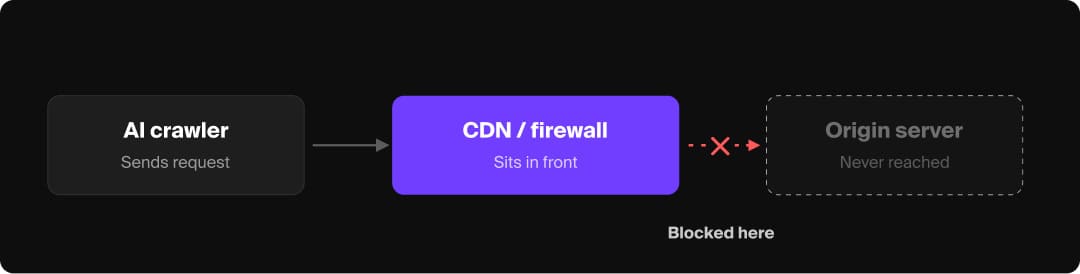
A content delivery network, or CDN, sits between a visitor (or a crawler) and your actual server, often caching pages at the edge (servers positioned close to users around the world, rather than your one origin server) to serve them faster and filtering incoming traffic for security. That position, in front of your server, is exactly why it can block or alter what an AI crawler sees before your own team ever notices anything is wrong.
CDN and caching configuration is a common silent failure point in technical AEO, often because nobody on the content or marketing team typically owns it.
Cloudflare has blocked AI crawlers by default for all new domains since mid-2025. Roughly one-fifth of global internet traffic runs through Cloudflare’s network, which means a meaningful number of sites are blocking AI crawlers through a default setting nobody consciously chose. The original toggle was a single “block AI bots” switch; Cloudflare has since split it into three separate categories: Search, Agent, and Training, with new, more granular defaults for Training and Agent crawlers on ad-supported pages taking effect September 15, 2026.
Either way, the practical advice holds: if your site sits behind Cloudflare, check the AI Crawl Control settings directly rather than assuming your robots.txt is the only gate in place.
A few other configuration issues to check:
- Cache-control headers that serve a stale or stripped version of a page to crawlers, especially on sites using aggressive edge caching for performance.
- Redirect chains at the edge that resolve correctly for a browser but break for a crawler that does not follow the same redirect logic.
- Missing or conflicting canonical tags, especially across regional or parameterized URL variants, which can leave an AI crawler uncertain which version represents the real page, muddying the entity clarity signals that matter for AI trust and citation.
- Firewall or bot-management rules that block by request pattern rather than by verified user agent, which can catch AI crawlers as unintended collateral.
How To Check Whether AI Crawlers Can Actually Read Your Site
The most direct way to confirm AI crawler access is to check your server logs and test your robots.txt file rather than guessing.
- Search your site’s raw server logs for AI crawler user agents, including GPTBot, ClaudeBot, PerplexityBot, Google-Extended, and OAI-SearchBot. If none of these show up, something upstream, often a CDN or firewall rule, is likely blocking them before they reach your server.
- Test robots.txt against each crawler’s published user agent using a robots checker rather than assuming your rules are working as written.
- Confirm page content exists in raw HTML, using the view-source check described above, on every page type you care about, not just the homepage.
- Cross-check with a citation-tracking tool if you need this measured on an ongoing basis rather than as a one-time spot check. A manual log review works for a single audit; it stops scaling once you are tracking dozens of pages across multiple platforms.
The Structured Data Worth Prioritizing
Structured data, often implemented as schema markup, is a standardized code format added to a page that explicitly labels what the content is (an article, a product, a set of questions and answers). Structured data gives AI systems an explicit, machine-readable answer instead of leaving them to guess from the surrounding page copy.
Not every schema type carries equal AEO weight, though, so there are a few key types to prioritize. These schema types apply almost universally for most sites:
- Organization schema establishes who you are as an entity, which underpins every other trust and citation signal.
- Article schema identifies authorship, publish date, and content type, all of which feed E-E-A-T evaluation.
- FAQPage schema tells search engines and AI crawlers explicitly that a page contains question and answer pairs. Google retired the visible FAQ rich result feature in May 2026, but structured data that isn’t used for a visible SERP feature can still help crawlers understand page content, and that structured signal is still useful for AI citation.
The next schema type worth prioritizing depends heavily on what kind of business or page you are working with. A generic “add schema” recommendation misses that a fintech company, an ecommerce site, and a local service business need very different markup to describe what they actually offer. Here’s a quick-reference guide to help you prioritize the right type of schema for your website:
| Business or page type | Schema type to prioritize | Why it matters |
|---|---|---|
| Ecommerce | Product | Gives AI shopping agents the pricing, availability, and review data needed to recommend a specific item. |
| SaaS or software | SoftwareApplication | Surfaces pricing tiers, platform compatibility, and ratings for AI-generated product comparisons. |
| Financial services or fintech | FinancialProduct | Covers the rates, fees, and terms that AI systems need to compare financial offerings accurately. |
| Local or service-area business | LocalBusiness | Carries hours, address, and service area information that matters more here than Author or Article schema. |
| Content publishers and media | Person (author) | Reinforces the authorship signal Article schema already provides, especially for bylined, credentialed writers. |
Niche types like HowTo schema only matter when the page itself is a step-by-step process. Implementing any of these outside their actual use case adds noise without adding signal.
One caution: avoid generic schema like “Thing” or “WebPage” markup. They technically validate but tell an AI system nothing useful about what the page actually is.
How to check it yourself:
Different schema validator tools test for different things, but it’s helpful to use both Google’s Rich Results Test and the Schema Markup Validator at schema.org. You can paste either a URL or code snippet into either tool to test your schema markup and identify errors.
Google’s Rich Results Test checks whether a schema type is eligible for one of Google’s own supported rich result features. It’s useful for confirming which rich results can be generated by the structured data on your page (carousels, merchant listings, breadcrumbs, and other results beyond the standard blue links) but overlooks schema types that Google does not build a rich result for. The list of schema types supported by Google also changes over time, so some types that used to be checkable by the Rich Results Test no longer are, even though the markup itself is still valid and still read by AI crawlers.
The Schema Markup Validator at schema.org checks something more fundamental: whether the markup is syntactically valid against the schema.org vocabulary itself, the same format AI crawlers actually parse regardless of whether Google renders anything special for it. For AEO purposes, a clean pass from the validator generally matters more than rich result eligibility, since a syntactically valid FAQPage or FinancialProduct schema still communicates meaning to an AI system even with no rich snippet attached to it.
If you’re auditing a whole site rather than testing one page at a time, Google Search Console’s Enhancements rich results report is a faster way to spot errors at scale, but it only covers types Google has built a dedicated rich-result feature for. Types like FinancialProduct or SoftwareApplication won’t show up there (whether they’re valid or not), so the Schema Markup Validator remains the more complete check for anything outside Google’s supported list.
Where Accessibility and AI Crawlability Overlap
The structural work that makes a page usable by a screen reader is largely the same work that makes it parseable by an AI crawler. A useful rule of thumb, backed by Siteimprove’s research on the accessibility overlap: if a screen reader can parse your page, an AI system probably can too.
The overlap is concrete, not just conceptual:
- Alt text is in practice, the only description of an image that reaches an AI system at crawl time. AI crawlers can download the image file itself without understanding what’s in it; any real image analysis happens through a separate process, not the crawl. Without alt text, an image’s content is effectively invisible to whatever produced the answer, even if the file was technically fetched.
- Semantic HTML tags, like nav, main, and article, function as a structural roadmap for both screen readers and AI crawlers trying to distinguish primary content from navigation or ads.
- A consistent heading hierarchy helps both audiences understand what a section is about without needing surrounding context.
This is not a claim that AI systems check WCAG (Web Content Accessibility Guidelines) compliance directly. However, the same underlying markup decisions serve both purposes at once, which means accessibility work and technical AEO work should live in the same checklist rather than two separate ones.
Agentic Browsing in Lighthouse
Chrome’s own tooling has started to formalize this overlap. Lighthouse added a dedicated Agentic Browsing category in May 2026, which treats the accessibility tree as the primary data model an AI agent reads from, rather than as a separate accommodation for screen reader users.
Agentic browsing does not produce a single 0 to 100 score like Lighthouse’s other categories, since the underlying standards are still forming. Instead, it reports a pass ratio across specific checks, like whether interactive elements have accessible names and whether layout stability holds up long enough for an agent to act on what it sees. PageSpeed Insights inherited the category shortly after launch, so most sites can run it without any extra setup.
Agentic Commerce: The Access Layer Beyond Crawling
Crawling determines whether an AI system can cite your content. Agentic commerce is a related but separate layer: whether an AI shopping agent can find your products and complete a transaction on a shopper’s behalf.
Shopify is a useful example of how fast this is moving. As of May 2026, Shopify made /agents.md the canonical AI-discovery file across its storefronts, with /llms.txt and /llms-full.txt now mirroring that file rather than standing on their own.
For ecommerce brands, check whether your platform supports agentic commerce. If a shopper asks an AI agent to compare and buy a product in a category you sell, and your catalog is not accessible in a format that agent can parse and transact against, you might be excluded from that sale entirely, regardless of how strong your SEO or content is.
Checking whether your platform already generates an AI discovery file, and whether your product, pricing, and policy data are machine-readable, is worth doing now rather than after a competitor has already captured agent-driven purchases you never had a chance to compete for.
Does Hreflang Still Matter for AEO?
Yes, but less directly than it does for traditional SEO. Hreflang still works as intended on AI surfaces built on top of Google and Bing’s own infrastructure, like AI Overviews, AI Mode, and Copilot, since both underlying search engines have supported the signal for years.
Independent testing by Glenn Gabe found a different pattern on conversational AI platforms: ChatGPT, Perplexity, and Claude often translate the answer correctly into the user’s language but still cite the wrong-region URL, typically the US English version, rather than substituting in the localized page. Hreflang tells search engines which URL to serve, but (for now) it does not appear to control which URL a generative AI system chooses to cite. These are fast-moving platforms, though, and it’s worth re-testing periodically rather than treating this as settled.
The practical takeaway: make sure hreflang is properly implemented, since it still matters for duplicate content signals and Google/Bing-based AI surfaces. Just keep in mind that it doesn’t guarantee that a localized page will get cited in a conversational AI answer.
Embedding real regional context, local currency, addresses, and region-specific terminology directly in the page copy is the more reliable lever right now, since that gives every retrieval system something to match against beyond markup alone.
Technical AEO Audit Checklist
Ready to check your site’s technical AEO health? Start with an audit, working through these in order of leverage:

- Check server logs for AI crawler activity. Confirm GPTBot, ClaudeBot, PerplexityBot, and Google-Extended are actually reaching your server.
- Test robots.txt and CDN bot settings together. A clean robots.txt file does not help if your CDN is blocking crawlers upstream.
- View source code on your key pages. Confirm your main content, and your structured data, exist in the raw HTML response.
- Check TTFB on your most important pages. Anything consistently above a few seconds is a real risk, not a minor inefficiency.
- Validate your schema. Check Organization, Article, and FAQPage schema, plus Product schema if you run an ecommerce site, with a schema validator.
- Run an accessibility pass alongside your technical SEO audit. Alt text, semantic HTML, and heading hierarchy serve both human and AI audiences.
- Run Lighthouse’s Agentic Browsing test. Use PageSpeed Insights or Chrome DevTools to check for a concrete pass ratio on agent-readiness checks.
Solid technical AEO will ensure your other optimizations (content, entity clarity, earned citations) pay off.
If you want a clearer read on where your site stands on crawlability, rendering, and structured data, that is exactly the kind of audit our team runs for clients as part of our answer engine optimization services.
Frequently Asked Questions
Is GEO replacing SEO?
AI answer engines still rely heavily on live web search and crawled indexes for a large share of what they retrieve, which means technical SEO health is still part of AI visibility rather than a competing discipline. Treat GEO as a layer built on top of SEO fundamentals, rather than a replacement for them.
Do I need an llms.txt file for AEO?
Probably not as your first priority. An Ahrefs study published in June 2026 found that 97% of llms.txt files across 137,000 sites received zero requests in a given month, no bots and no humans. Google’s AI search guidance says the file is not required to appear in AI Overviews or AI Mode. However, it is low-cost to add an llms.txt file and unlikely to hurt anything, so there’s no harm in having one, but it shouldn’t come ahead of crawler access, structured data, and content quality on a priority list.
Can I block AI crawlers without hurting my SEO?
Yes, as long as you are specifically blocking AI training crawlers, like GPTBot or Bytespider, and leaving Googlebot and Bingbot untouched, since those are the crawlers that actually drive traditional search rankings. The complication is that a lot of sites are doing this unintentionally: Cloudflare has blocked AI crawlers by default for new domains since mid-2025, which means many site owners are already blocking AI visibility without having made that choice on purpose. Check your CDN’s bot settings directly rather than assuming your robots.txt file is the only control in place.