
TL;DR:
- AI tools like Claude Design, Figma, and v0 have made building a SaaS prototype trivial, but they haven’t made deciding what’s worth building any easier
- Durable SaaS products still depend on the things AI can’t generate:
- Validating a real problem with real users
- Getting the core flows right (onboarding, permissions, feature depth, iteration, design systems)
- Choosing the right design system approach for your stage
- Designing for the correct combination of market axes (horizontal vs. vertical, platform vs. point solution, PLG vs. sales-led).
AI tools have made it possible for anyone to quickly spin up a SaaS prototype on a Sunday afternoon, no design background required. So what actually differentiates a product people actually want to adopt, trust, or pay for, from one that looks like every other AI-generated dashboard? In order to create a valuable SaaS product we need to take a step back and ask:
- What problem are we actually solving for, and has it been solved before?
- What makes this product sticky and memorable?
- Will this still matter in the next 2, 5, 10 years?
Although AI has made building SaaS products easier, it didn’t make deciding what’s worth building any easier. That’s still where product designers (founders, innovators…) hold tremendous value.
Where to Start: SaaS Product MVPs in the AI Era
Product design has always lived at the intersection of user needs, business goals, and functionality. There’s the user interface UI to consider, along with the user experience and overall flow of the product features as a whole. You can read more about the differences between UI / UX here. AI tools haven’t changed that equation, they’ve just changed who’s capable of executing on it. With tools like Claude Design, Figma, and v0, the barrier to a working prototype has more or less disappeared. However the foundational principle and steps to take in order to actually make a good product has not changed.
So before you jump to a AI generated MVP or wireframe, we need to do the research and leg work first:
- Identify the specific problem you’re looking to solve and think: Who has this problem? Is this something you’ve experienced personally, or something you’re noticing at a market/industry or societal level? How are other competitors solving this today?
- Validate with real target users, this can range from 5 people and up depending on your resources and network. Hearing from actual users you have in mind or people who you think experience these issues is where the UX research really comes in in order to validate if this is something people actually want a solution for, or if what you’re proposing seems like a valid idea.
- Treat AI output as a first draft, not a finished system. It still needs a designer’s judgment layered on top (deciding what to keep, what to cut, and what doesn’t fit the actual user).
This reframes the MVP conversation. The question is not “can we ship or build this.” It should always be “can this hold value”. Once the novelty of an AI-assisted build wears off and users are left with whatever’s actually underneath, this is when the test of whether a SaaS product can stand on its own two feet is revealed.
Common SaaS Challenges & Flows to Get Right
SaaS products are living systems, not one-time launches. Although speed to ship can be important especially if competing brands want to get their feature to market first, the even more crucial metrics of SaaS product success are measured in engagement, activation, and retention. With that in mind, there are a few common SaaS product user flows that play key roles in the success of these metrics and overall reducing friction in a user flow that SaaS team need to solve for:
| Flow | Why it Matters | SaaS brand that gets it right | What they do differently |
|---|---|---|---|
| Onboarding & Activation | Most churn happens before a user ever sees real value, often within the first week | Slack | Slackbot teaches the product through conversation inside the real interface, not a bolted-on tour; users learn by doing, not by watching |
| Permission & Persona Complexity | One flow rarely fits admins, end-users, and viewers equally | Notion | Granular, page-by-page permissioning lets the same workspace serve an admin, a guest, and a viewer at once, without forking the product into separate experiences |
| Feature Depth vs. Usability | Every added additional custom button (ie. toggle) is a small tax on everyone else’s experience | Linear | Intentional type sizes, one accent color, and a fixed workflow (Triage → Backlog → In Progress) that removes decisions instead of adding options |
| Data-Informed Iteration | Aesthetic preference doesn’t predict behavior | Amplitude | Builds its own product on the same behavioral-analytics discipline it sells; design decisions get traced back to activation and retention data, not internal opinion |
| Scalable Design Systems | Ad hoc UI decisions compound into technical debt | Figma | The component and design-token system is the product; it’s built to hold together as teams, files, and plugins scale, which is exactly why it’s the default tool other SaaS design teams standardize on |
Why Do Design Systems Make or Break a SaaS Product?
A design system is the shared library of components, tokens, and rules that lets product and engineering teams ship consistent UI without redesigning every screen.
It isn’t just about the logo or what type of font is being used. It is the backbone behind scaling products, creating a consistent visual language, and making UI/UX decisions in a more seamless way. Design systems allow engineer teams to speak the same language as a product designer in order to ship with consistency without the designer reviewing every single button.
Underinvesting in a solid design system doesn’t show up immediately. It often shows up after a feature is launched as technical debt or moments when UI is reactive and patched together to fix a product bug or user concern. Without a consistent system, the product experience feels like it’s been designed by a team of different people (because it was). As mentioned SaaS product success is rooted in clear metrics. When there is more friction in UX or UI, that friction causes churn. This is all to say, the design system is a critical piece in SaaS product success and should not be an afterthought.
There are a few different approaches when it comes to starting a new design system. Here’s a breakdown of what to consider that I personally would have found helpful before starting new product design projects:
| Approach | Best For | Speed to Launch | Customization & Brand Differentiation | Maintenance Overhead | Real-World Examples |
|---|---|---|---|---|---|
| Pre-Built (Material UI / Google’s design system) | Internal tools, admin panels, MVPs where speed matters more than brand distinctiveness | Fastest | Low-Medium: Limited room to feel unique to your brand | Low: Google maintains the underlying system | Retool, Quickbase: Tools built explicitly for fast internal/admin surfaces where the interface just needs to work, not stand out |
| Pre-Built (shadcn/ui) | Early-stage SaaS that wants speed without looking generic, unstyled primitives you theme yourself | Fast | Medium-High: You own the copied component code, so theming goes deeper than Material UI allows | Medium: You inherit maintenance the moment you copy the code in | Vercel: Common across early-stage, startups shipping fast post-launch |
| Fully Custom Design System | Category leaders where design is the differentiator, the product’s function alone doesn’t set it apart | Slowest, highest up-front investment | High: Full control, most distinctive | High: Requires a dedicated design systems team to maintain | Figma, Linear, Notion: the “craft tool” bucket from earlier, where the UI is the reason people stay loyal |
| Hybrid (custom shell, built-for-scale primitives underneath) | Large B2B platforms serving dozens of modules and user types, where consistency at scale matters more than novelty per screen | Medium | High: For user-facing surfaces, standardized for internal/admin ones | Medium: The system is bespoke, but reusable enough to not rebuild per feature | Atlassian (Atlaskit), Salesforce (Lightning Design System), HubSpot (Canvas): Each built its own internal system that functions like a pre-built library across a sprawling product suite |
At the end of the day your approach to the system build depends on what makes most sense for the goals of your company, the resources you have, and how you want to scale your company in the future.
How Are SaaS Products Categorized in 2026?
SaaS products are classified across three axes at once: how wide the audience is (horizontal vs. vertical), how much the product does (platform vs. point solution), and how it’s sold (PLG vs. sales-led vs. hybrid).
Go back to our primary questions to consider:
- What makes a product sticky? The answer is different depending on what kind of SaaS product you’re building.
- How are SaaS products categorized these days anyway? There are three separate axes that the industry often uses and most products get classified across all three at once, not just one.
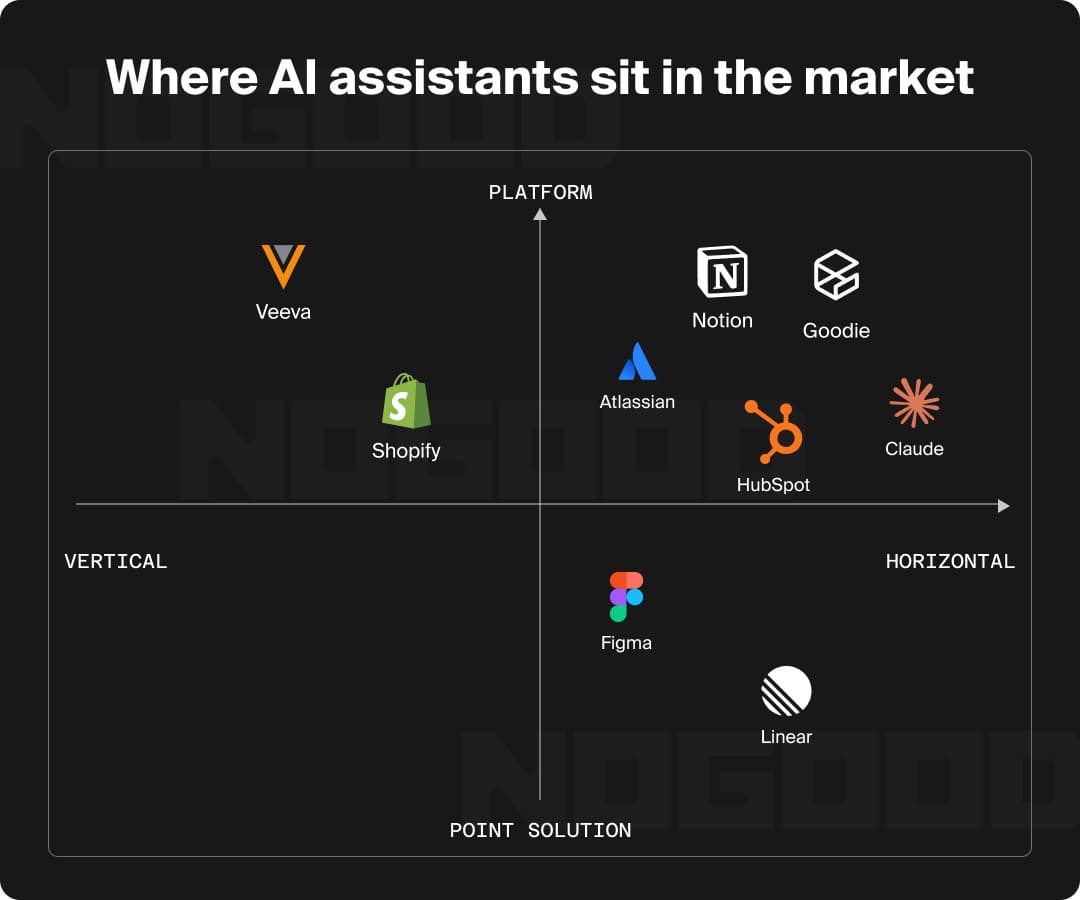
- Horizontal vs. vertical is about how wide the SaaS audience is. A horizontal product serves any industry with the same core features; think a CRM or a communication tool that works the same whether you sell software or food. A vertical product is built for one specific industry’s workflows, compliance needs, and terminology; think a CRM built only for food brands for example. Horizontal products chase a bigger total audience market; vertical products trade market size for deeper fit and stickier retention.
- Platform vs. point solution is about how much the product does. A point solution focuses on a single workflow. A platform is a point solution that expands into a suite of connected products, usually because it wants to gain more ground or wants to lock customers in across more of their workflow. As AI-native features get built into big platforms, standalone point solutions are getting absorbed or replaced.
- PLG vs. sales-led (SLG) vs. hybrid is about how the product gets sold. Product-led growth (PLG) means the product itself does the convincing, no salesperson walks a new user through it. Sales-led (SLG) means a sales team drives the deal through demos and negotiation. The most competitive B2B SaaS companies run hybrid efforts that combine PLG’s acquisition efficiency with SLG’s revenue depth.
Where most-used SaaS products actually land:
| Product | Horizontal vs. Vertical | Platform vs. Point Solution | GTM Motion |
|---|---|---|---|
| Figma | Horizontal | Point solution that has expanded into a platform (FigJam, Dev Mode, code layers) | PLG |
| Notion | Horizontal | Platform (docs, wikis, databases, AI agents) | PLG |
| Linear | Horizontal | Point solution | PLG |
| HubSpot | Horizontal | Platform (Marketing, Sales, Service Hubs) | Hybrid: runs free tools for bottom-up adoption while a sales team pursues enterprise expansions |
| Shopify | Vertical (eCommerce specifically) | Platform (payments, shipping, capital, POS) | Hybrid: self-serve for SMBs, sales-assisted for larger merchants |
| Claude | Horizontal (used across every industry, not one vertical) | Started as a point solution (a chat interface) and is now a genuine platform with Claude.ai, Claude Code, Claude Cowork, the API, and an MCP ecosystem connecting to outside tools | Hybrid: self-serve signup drives individual adoption, with an enterprise sales flow for larger organizational deployments |
Almost nothing at real scale is purely one thing. The mistake most teams make is designing for the wrong combination of these three axes, chasing platform breadth when the product actually wins by staying a sharp point solution, or building a self-serve PLG flow for a product that will only ever close through sales. Where a product lands on these axes, and the design priorities that follow from it, come directly from what problem you’re solving and what’s actually going to make someone stay.
SaaS Product Design Takeaways
Successful SaaS products are rarely the result of only great engineering, or how fast AI made the MVP alone. The strongest ones emerge when product strategy, UX thinking, and visual design work together to create experiences that users want to adopt and trust over time. Now that it’s possible to get a near perfect looking dashboard or app faster than previous years, the product itself will only be effective if its truly solving a need. When thinking about SaaS product strategy and design, just remember that AI alone can’t answer those questions for you.
SaaS Product Design: Frequently Asked Questions
What is SaaS product design?
SaaS product design is the practice of shaping a software product’s user experience, interface, and core flows (onboarding, permissions, feature architecture) around real user needs and business goals. It spans UX research, UI design, and product strategy, and determines whether users adopt, trust, and keep paying for a product.
What can’t AI do in SaaS product design?
AI can generate prototypes, wireframes, and polished-looking dashboards, but it can’t decide what’s worth building. Identifying the real problem, validating it with actual users, and applying design judgment (what to keep, cut, or change for the target user) still requires human product thinking.
Why do design systems matter for SaaS products?
A design system is the backbone of scaling a product: it gives designers and engineers a shared visual language so features ship consistently without every button being reviewed. Underinvesting doesn’t hurt immediately; it surfaces later as technical debt, patched-together UI, and friction that drives churn.
Should you build a custom design system or use a pre-built one?
It depends on stage and differentiation. Pre-built systems like Material UI suit internal tools and MVPs where speed wins; shadcn/ui suits early-stage SaaS that wants speed without looking generic; fully custom systems suit category leaders where design is the differentiator; hybrid approaches suit large multi-module B2B platforms.
What’s the difference between horizontal and vertical SaaS?
Horizontal SaaS serves any industry with the same core features (like a general-purpose CRM) chasing a larger total market. Vertical SaaS is built for one industry’s specific workflows, compliance needs, and terminology, trading market size for deeper fit and stickier retention.