
AI search ROI is measurable, just not as one number. You measure it in three layers: how often AI answers mention and cite your brand, how much traffic those answers send, and how much revenue and pipeline that traffic and exposure produce. Then you correct for the AI traffic your analytics tool files under Direct or Organic Search.
Most guides ranking for this topic come from vendors, and many lead with a confident ROI percentage. This one does not. Below is what each measurement tool shows and misses as of late 2026, how to set up the parts you control, a simple ROI model, and how to report the result to leadership without overclaiming.
What Is AI Search ROI?
AI search ROI is the return a brand gets from being visible in AI answer engines (ChatGPT, Google AI Overviews and AI Mode, Gemini, Perplexity, Copilot, Claude) relative to what it spends on answer engine optimization (AEO). The return includes direct revenue from AI-referred visits, plus the influence AI answers have on buyers who convert later through another channel.
That second part is why AI attribution is hard. AI search sends relatively little measurable traffic. Conductor’s 2026 AEO/GEO Benchmarks Report put AI referrals at 1.08% of all website traffic across 10 industries (May to September 2025 data). Much of the value happens in the answer itself, where a buyer reads your name, adds you to a shortlist and comes back later by typing your URL or searching your brand.
So the honest version of AI search ROI is a range built from several signals, with every estimate labeled as one.

Why AI Search Traffic Shows Up As Direct Or Organic
Before building a model, understand where AI traffic attribution breaks down. There are four main leaks.
- No referrer. Many AI apps, embedded browsers and copy-pasted links send no referrer header, so GA4 records the visit as Direct. One vendor analysis of 446,405 visits classified 70.6% of the AI-driven visits it detected as arriving without a referrer (Loamly). The detection method is proprietary and the dataset is the vendor’s own, so treat the figure as directional.
- Google’s AI surfaces count as Organic Search. Clicks from AI Overviews and AI Mode carry a google.com referrer, so GA4 groups them with regular organic clicks. Google’s default channel group documentation explicitly excludes AI Overviews and AI Mode from the new AI Assistant channel.
- The native channel isn’t retroactive. GA4 added the AI Assistant channel on May 13, 2026 (Analytics release notes). Sessions before that date stay in Referral or Direct, so year-over-year comparisons in the default grouping won’t line up until mid-2027.
- Zero-click influence. A buyer who reads a ChatGPT answer recommending you and later searches your brand name shows up as branded organic search, or as Direct. No referrer exists for that path.
The result: AI referral numbers in GA4 are a floor, not a total. Any ROI calculation built only on them will understate the return.
A Three-Layer Framework For Measuring AI Search ROI
The visibility → traffic → revenue model appears in a lot of competing guides. The difference is in which data sources you assign to each layer and how you handle the gaps between them.
Layer 1: Visibility
This layer measures AI search visibility. It answers one question: are AI answers mentioning and citing you for the prompts your buyers use? Track:
- AI share of voice: your brand’s share of mentions across a fixed prompt set, compared with named competitors.
- Citations: how often your pages are linked as sources, and which pages.
- Search Console AI impressions and Bing AI citations: how often your pages appear in AI Overviews and AI Mode, and how often Copilot and Bing cite them (more on both reports below).
Visibility tools sample answers to prompts you choose, so the numbers depend on the prompt set. Keep the set stable quarter to quarter, or your trend line is measuring prompt changes, not performance. For tool selection, see our breakdown of AI search visibility tools.
Layer 2: Traffic
This layer measures AI referral traffic: the visits AI answers send. Track:
- GA4 AI Assistant channel sessions, for referrers Google recognizes.
- A custom AI channel group, to catch the sources the native list misses and to apply the grouping to historical data.
- A dark AI traffic estimate, labeled as an estimate (method below).
Layer 3: Revenue And Influence
This layer connects AI exposure to money. Track:
- AI-sourced conversions and revenue from the GA4 channel and your CRM.
- Self-reported attribution: an open-text “How did you hear about us?” field on demo, signup and checkout forms. Code answers that name ChatGPT, Perplexity, Gemini, “AI” or “an AI search.”
- Branded search lift: growth in branded queries in Search Console above your pre-AEO baseline.
- Pipeline influence: opportunities in your CRM where any contact had an AI touchpoint or self-reported AI discovery.
Layer 1 moves first, usually within weeks of content changes. Layer 3 moves last, often a full sales cycle later. That lag shapes how you report it, which we cover below.
AI Search Analytics: What Each Measurement Tool Shows And Misses
No single tool covers all three layers. Here is what each one gives you as of November 2026.
| Tool | What it shows | What it misses |
|---|---|---|
| GA4 AI Assistant channel | Sessions and key events from AI referrers Google recognizes, from May 13, 2026 | Referrer-less visits, AI Overviews and AI Mode clicks, sessions before May 13, assistants not on Google’s list |
| GA4 custom AI channel group | Your own list of AI sources, applied to historical data | Referrer-less visits; needs updating as new assistants appear |
| Search Console generative AI report | Impressions in AI Overviews and AI Mode by page, country, device and date | Clicks, CTR, queries and any non-Google assistant |
| Bing Webmaster Tools AI Performance | Citations, cited pages and grounding queries across Copilot, Bing AI summaries and partners | Clicks and any non-Microsoft assistant; grounding queries are a sample |
| Merchant Center AI performance insights | Share of voice vs. similar brands, shopping funnel and product term insights across AI Mode, AI Overviews and Gemini | Non-Google assistants, non-shopping queries and markets not yet rolled out |
| AI visibility tools (e.g., Goodie AI) | Mentions, citations, share of voice and sentiment across major assistants | Real user behavior, traffic and revenue; results depend on the prompt set |
| CRM and self-reported attribution | Pipeline and revenue, including AI discovery that left no referrer | Recall bias, skipped answers and free text that needs coding |
GA4 AI Assistant Channel
Recognized AI referrers now get the medium “ai-assistant” and their own default channel. Google’s documentation describes it as covering “sources like ChatGPT, Gemini, Deepseek, Copilot, or Grok” and does not publish a complete list. Perplexity is not among the named examples, so check whether perplexity.ai sessions are landing in Referral in your property. Google added a separate Source Group field on June 11, 2026 that names Perplexity, which is a sign the classification is still changing.

Search Console Generative AI Performance Report
Google announced the report on June 3, 2026 and rolled it out to all sites worldwide on August 31, 2026. According to the Search Console help doc, it shows impressions in AI Overviews and AI Mode by page, country, date and device. It does not show clicks, CTR or queries. Clicks from those features stay folded into your regular Search performance totals and land in GA4 as Organic Search.
Use it as a visibility metric for Google’s own AI surfaces, not a traffic metric. Rising AI impressions on a page with flat organic clicks is a sign the AI Overview is answering the query without sending the visit.

Bing Webmaster Tools AI Performance
Microsoft launched the AI Performance report in public preview on February 10, 2026. It shows how often your pages are cited as sources in Microsoft Copilot, Bing’s AI-generated summaries and select partner integrations, which pages are cited, and a sample of the grounding queries the AI used to retrieve them. It doesn’t report clicks. The grounding queries are the most useful part: they show the questions you are already cited for, which makes a better starting prompt set than guesses.
Merchant Center AI Performance Insights
For ecommerce brands, Google announced AI performance insights in Merchant Center on May 27, 2026. They cover AI Mode, AI Overviews and the Gemini app, and include share of voice benchmarked against similar brands, shopping funnel performance from discovery to purchase, product term insights and an attribute completeness score. The rollout covers the U.S., Canada, Australia, India and New Zealand “in the coming months,” so check whether your account has it yet.
AI Visibility Tools
AI visibility tools track mentions, citations, share of voice and sentiment across ChatGPT, Perplexity, Gemini, Claude and Google’s AI surfaces. At NoGood, we use Goodie AI for this. They are the only way to see visibility on assistants that don’t report to you. Their limit is that they measure sampled answers to your prompt set, not real user behavior, and AI answers vary from one run to the next. Read trends across weeks, not single-day changes.
CRM And Self-Reported Attribution
This is where AI influence that never produced a click shows up. “ChatGPT recommended you” in a demo form is a stronger signal than any referrer. The limits are recall bias, low completion rates on optional fields, and free text that needs coding. Make the field required on high-intent forms and review the answers monthly.
How To Track AI Referral Traffic In GA4
We covered the full setup, including server logs and UTM conventions, in How To Track AI Traffic To Your Website. For ROI reporting, these are the steps that matter.
- Check the native channel. In Reports > Acquisition > Traffic acquisition, set the primary dimension to Session default channel group and find AI Assistant. Note the date it first appears in your property.
- Build a custom channel group. In Admin > Data display > Channel groups, copy the default group and add a channel called AI Search. GA4 standard properties allow two custom channel groups (five on GA4 360). Custom groups apply to historical data when you select them in reports, which the default AI Assistant channel does not. If you set one as your primary channel group, though, it only applies going forward.
- Define the rule. Set the condition to Source matches regex for known AI referrer domains, OR Medium exactly matches “ai-assistant.” An example regex: .*(chatgpt|openai|perplexity|claude\.ai|gemini\.google|copilot\.microsoft|deepseek|grok\.com|meta\.ai|you\.com|phind).* GA4’s “matches regex” condition must match the whole value, which is why the pattern starts and ends with .*
- Order it below paid, above Referral. GA4 evaluates channel rules from top to bottom and assigns each session to the first match. If Referral sits above AI Search, Perplexity and other unlisted sources stay in Referral. Keep the paid channels above it, so a paid campaign tagged with an AI source (for example, utm_source=chatgpt.com) still counts as paid.
- Mark your key events. ROI needs conversions. Confirm that demo requests, signups or purchases are set as key events, then compare the AI Search channel’s key event rate with Organic Search.
- Check Unassigned. Misconfigured rules often push sessions into Unassigned. Our GA4 unassigned traffic guide covers how to diagnose it.
At NoGood, we use a standardized custom channel grouping across client properties that separates LLM traffic, places it above Referral and handles unassigned traffic. Standardizing the rules means AI numbers are comparable across accounts and over time.


How To Connect AI Search Visibility To Revenue
Here is the ROI model we use as a starting point. It produces a range, not a point estimate, because each layer adds uncertainty.
Floor (measured): AI channel sessions × conversion rate × value per conversion.
Corrected (+ dark AI): add an estimate of dark AI sessions, valued at the same rate.
Influenced (+ self-reported): add conversions where buyers self-reported AI discovery but GA4 credited another channel, plus any branded search lift above baseline you can reasonably attribute.
ROI = (AI-attributed value − AEO investment) ÷ AEO investment, calculated at each level.
For lead generation, value per conversion is pipeline value × close rate, not the full deal size. For ecommerce, use average order value or, better, margin.
How To Estimate Dark AI Traffic
Use one of two methods, and write down which one you chose.
- The self-reported gap. If 6% of new leads say they found you through an AI tool, but the GA4 AI channel accounts for 2% of leads, the GA4 number is undercounting by roughly 3x. Apply that ratio carefully, and cap it.
- The deep-page Direct baseline. Track Direct sessions that land on long, non-bookmarkable URLs such as blog posts and comparison pages. People rarely type those URLs. Growth above the pre-2024 trend on pages that AI tools cite is your candidate pool for dark AI traffic.
Whatever you pick, use a conservative multiplier. Vendor estimates of hidden AI traffic run as high as 70%. You will defend your number in a budget meeting, so pick one you can explain.
A Worked Example
The numbers below are hypothetical, to show the mechanics. A B2B brand spends $45,000 per quarter on AEO. GA4 shows 4,000 AI sessions, a 2.5% conversion rate and $400 in pipeline-weighted value per conversion. The team estimates that 40% of AI visits arrive without a referrer, and form data shows 25 additional AI-discovered conversions that GA4 credited elsewhere.
| Level | AI-attributed value | ROI on $45,000 |
|---|---|---|
| Floor (measured) | 4,000 sessions × 2.5% × $400 = $40,000 | −11% |
| Corrected (+ dark AI) | $40,000 + 2,667 estimated dark sessions × 2.5% × $400 = $66,667 | +48% |
| Influenced (+ self-reported) | $66,667 + 25 conversions × $400 = $76,667 | +70% |
The floor says AEO is losing money. The corrected and influenced views say it returns 48% to 70%. All three are true at once, and showing them side by side is more credible than picking the one you like.

What The Benchmarks Say About Conversion Quality
AI-referred visitors tend to convert well, which is why small traffic numbers can still matter. Adobe’s latest AI traffic analysis found that in September 2026, AI visitors to U.S. retail sites converted 90% better than non-AI traffic and generated 83% more revenue per visit. A year earlier, AI traffic converted worse than non-AI traffic. In travel, Adobe’s August 2026 data report still had AI converting 1% below non-AI.
Two takeaways. The value of AI traffic has changed fast and varies by industry, so don’t plug a published multiplier into your model. And the benchmark is retail data from a trillion-visit panel. Your own conversion rate by channel is the number that belongs in your ROI.
How To Report AI Search ROI To Leadership
The fastest way to lose an AEO budget is to report a single ROI figure that doesn’t hold up when finance asks how it was calculated. Report it as a leading-indicator story instead.
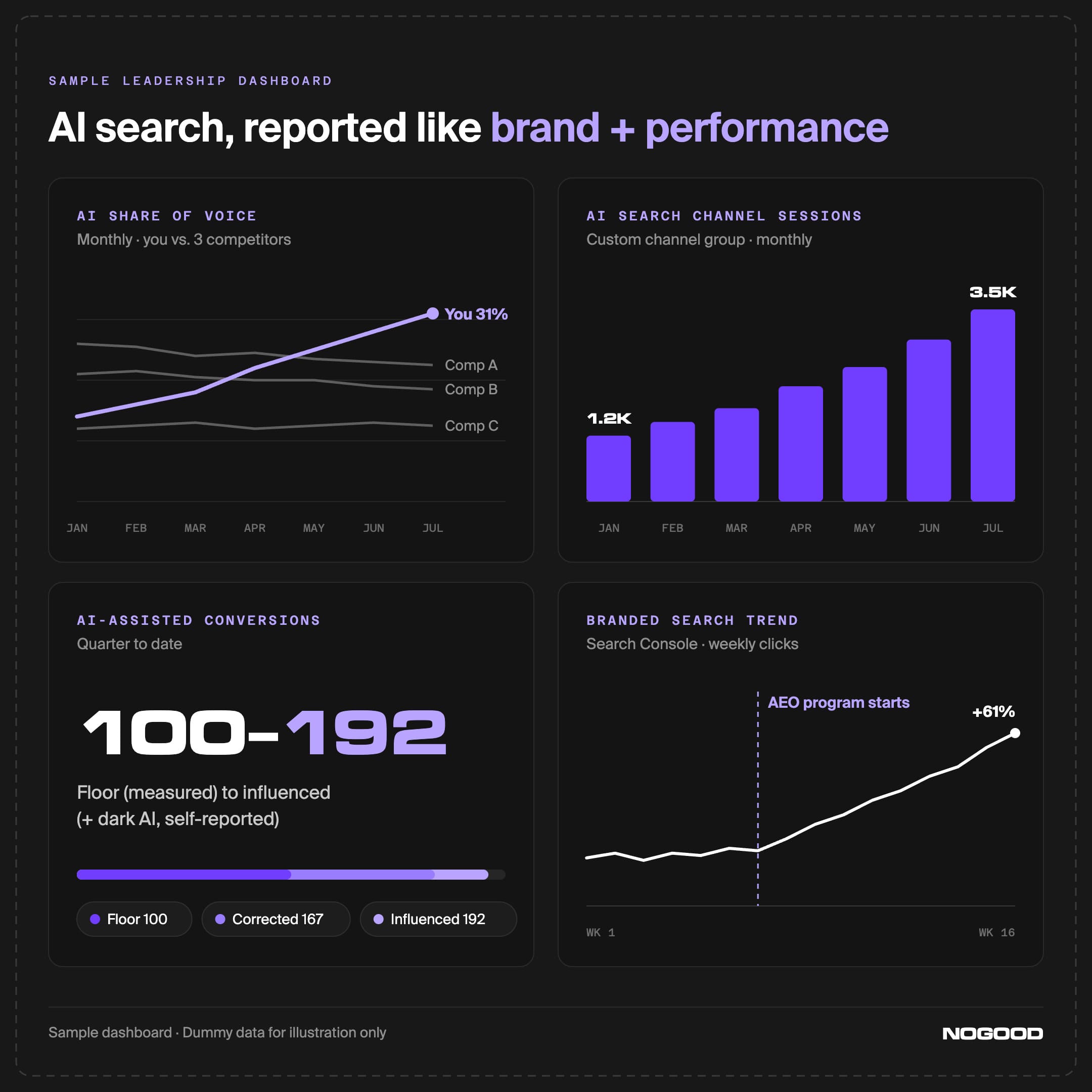
- Lead with visibility, monthly. Share of voice against named competitors, citation counts and Search Console AI impressions. These move first and show whether the work is landing.
- Show traffic and conversions, monthly. AI channel sessions and key events from your custom channel group, with the Organic Search comparison next to them.
- Report revenue and influence, quarterly. The floor/corrected/influenced range, self-reported AI share of leads and branded search trend. Quarterly matches the lag between visibility and pipeline.
- Annotate every methodology change. The May 13 channel launch, a new regex rule or a changed prompt set will all move your numbers. Note them on the chart so nobody reads a tracking change as a performance change.
- State what you can’t measure. One line on the dashboard saying “Google AI Overview clicks are included in Organic Search and can’t be separated” prevents most follow-up questions.
Frequently Asked Questions
What is AI search ROI?
AI search ROI is the return from being visible in AI answer engines compared with the cost of AEO. It combines visibility (mentions, citations, share of voice), traffic (AI referral sessions) and revenue (conversions, self-reported attribution, branded search lift), and it is best reported as a range.
How do you track AI referral traffic in GA4?
Use the AI Assistant default channel, added May 13, 2026, and build a custom channel group with a regex rule for AI referrer domains placed above Referral. The custom group catches sources Google’s list misses and applies to historical data.
What does Google Search Console show about AI Overviews and AI Mode?
The generative AI performance report shows impressions in AI Overviews and AI Mode by page, country, device and date. It doesn’t show clicks, CTR or queries. Clicks from those features are counted in regular Search performance totals.
Why does AI search traffic show up as direct or organic in analytics?
Many AI apps don’t pass a referrer, so GA4 records those visits as Direct. Clicks from Google’s AI Overviews and AI Mode carry a google.com referrer and are counted as Organic Search. Buyers who see your brand in an AI answer and search for it later also appear as branded organic traffic.
How do you connect AI search visibility to revenue?
Track AI-sourced conversions in GA4 and your CRM, add a required “How did you hear about us?” field, monitor branded search lift and estimate dark AI traffic. Combine them into a floor, corrected and influenced ROI range.
How should you report AI search ROI to leadership?
Report visibility and traffic monthly and revenue quarterly, show ROI as a range with the method behind each number, and annotate tracking changes. Present it as a leading-indicator story, not a last-click result.
NoGood’s Take: Report AI Search Like Brand Plus Performance
AI search doesn’t fit last-click attribution, and forcing it in will make the channel look worse than it is. A large share of its value is influence: buyers who meet your brand inside an answer and convert days later through Direct or branded search. That is how brand spend has always worked, and leadership already knows how to evaluate it. AI search ROI should be reported the same way: performance metrics where clicks exist, brand metrics where they don’t, and a range that is honest about the gap.
The tools will get better. Search Console may add clicks, GA4’s AI list will grow and Merchant Center’s insights will reach more markets. Brands that set up measurement now, even imperfect measurement, will have a baseline to compare against when that happens. Brands waiting for perfect attribution will start from zero. If you want a starting point, our AEO guide covers the strategy side, and the GA4 steps above are a practical place to begin measuring.