

In the last few months, YouTube has become the most important social media platform for AI citations. In Q1 of 2026, YouTube surpassed Reddit as the primary social media source AI cites, as the platform’s share of social citations quadrupled over four months.
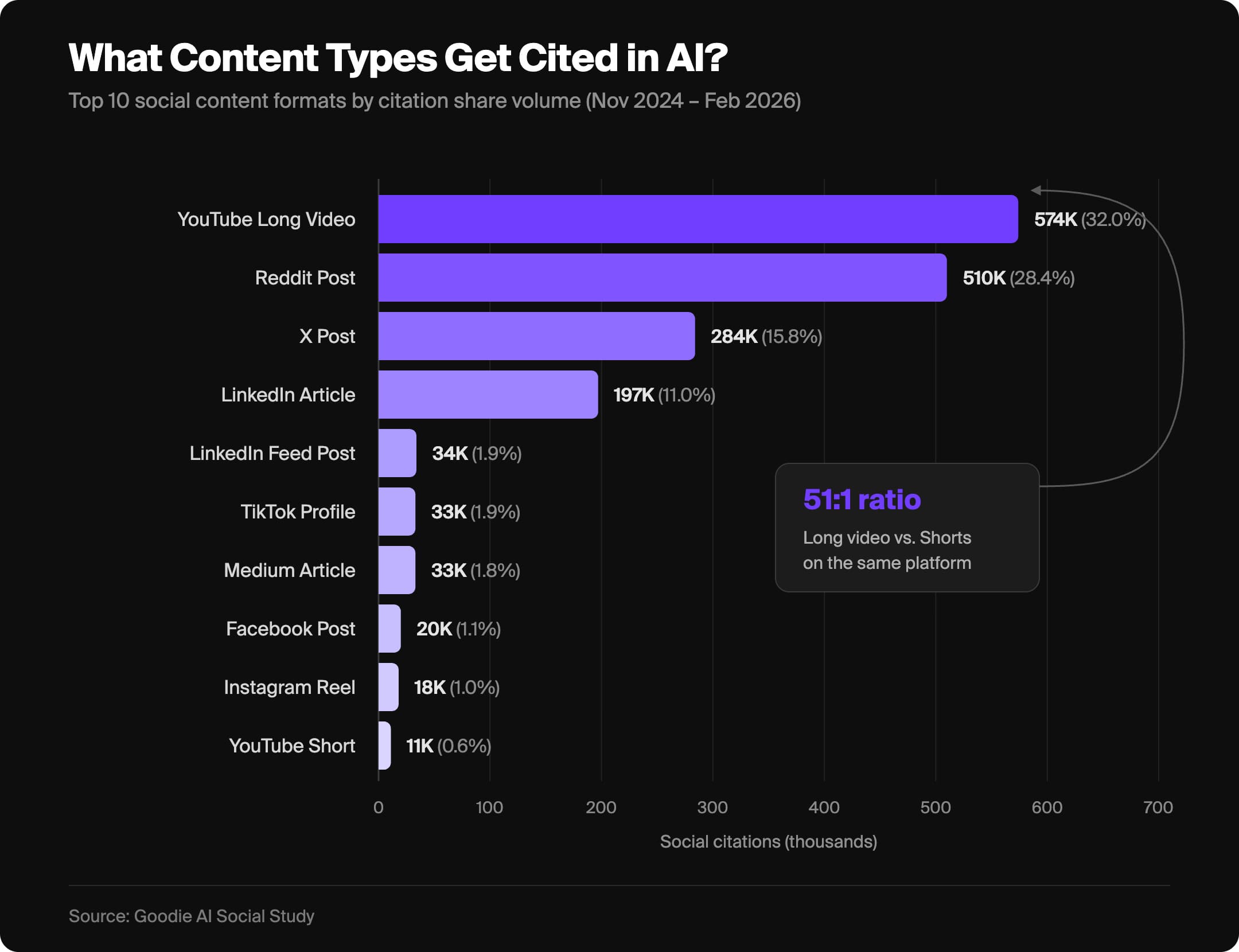
And it makes sense. YouTube is stacked full of explainers, which give AI models structured data and accessible transcripts to build answers around. It also helps that Google owns YouTube, making it a million times easier to leverage the platform for AI search results.
This makes YouTube an invaluable marketing channel for brands who are looking to extend their reach into AI Overviews and AI-generated responses. But a lot of brands are missing out because they don’t know how to optimize their content to… actually show up where users are searching.
What Is YouTube AEO?
YouTube AEO (Answer Engine Optimization) is how you optimize your video content so it becomes a source that AI models trust and reference when answering questions. This contrasts with YouTube SEO, which is how you optimize content to appear in YouTube’s search results.

Despite their differences though, the foundation of a strong YouTube AEO strategy isn’t too dissimilar to a strong YouTube SEO strategy.
Long-Form Content vs YouTube Shorts
Before we continue, there’s an important distinction we need to make before we continue: AI citation strength on YouTube skews heavily towards long-form content, not YouTube Shorts.
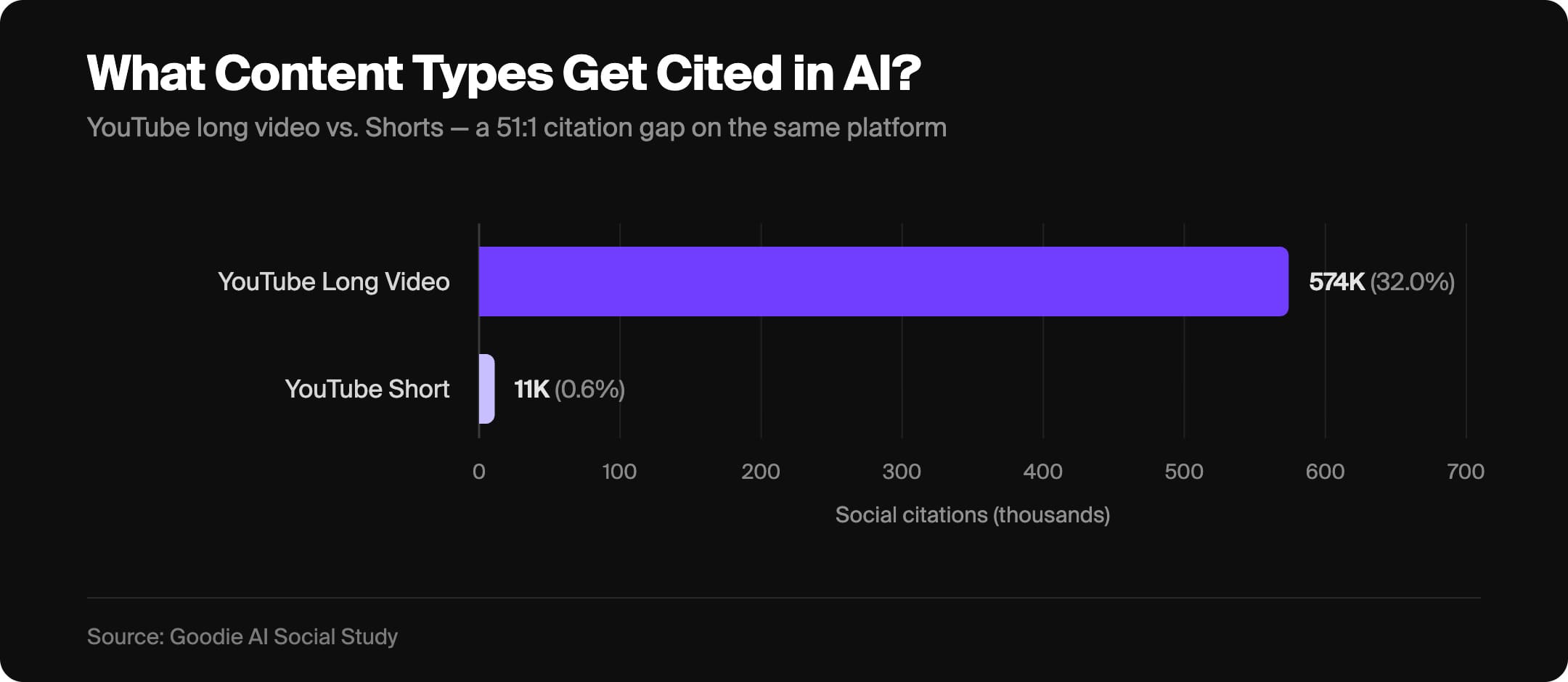
While YouTube Shorts are great for in-platform discoverability and engagement, they aren’t what AI models primarily focus on. They favor long-form videos because they contain more substance and signals that make content trustworthy and citable to AI: depth, context, and comprehensive coverage of a topic.
So before you start, you need to determine what is more important to your brand.
If you are trying to maximize in-platform reach, YouTube Shorts are still a fantastic option. But if your goal is to become a reliable source for AI search results, you will want to prioritize long-form video content.
Why AI Cites YouTube
YouTube’s uptick in AI citation strength over the past few months isn’t random happenstance. And it’s important to understand why this happened in the first place.
AI models choose to cite YouTube for three reasons:
- Accessible transcripts
- Explainer content
- Structured data
YouTube automatically generates transcripts for every video, which essentially gives AI billions of text documents that the models can parse. If your video is well organized and clearly explains a concept, you’re giving AI exactly what it needs to surface your content as an answer.
Google Gemini is also a critical part to this, as it actively parses not just your metadata, but the actual content of your videos. So what you say in your videos now matters just as much as how you label it.
YouTube AEO Tips & Strategy
As previously mentioned, YouTube AEO and SEO aren’t too dissimilar from one another. Here’s how to optimize for YouTube AEO.
Video Tags
Similar to an SEO strategy, your metadata is important when optimizing for YouTube AEO – and it all starts with your tags.
When it comes to optimizing YouTube videos for AEO, you want your tags to be a mix of specific and broad terms. Specific terms will tell AI models exactly what your video is about, while broader terms will help cast a wider (but still relevant) net for your content.

For example, if we were uploading a video about YouTube AEO, our specific tags might include: YouTube AEO strategy, AI citations YouTube, how to get cited by AI. While our broader supporting tags might include: AEO, AI search, AI visibility, answer engine optimization.
This balance is incredibly important. If your tags skew too broad, your video will get lost in the sea of content surrounding your topic or niche. But if your tags are too specific, then you’ll miss your potential wider audience. So use a mix of both, and remember: every tag you choose should be relevant to your video’s content.
If you’re struggling to come up with tags, I recommend starting with a keyword research tool like Rapidtags or vidIQ. These tools can help you brainstorm relevant keywords for your video.
Say Your Keywords Out Loud (Google Gemini is Listening)
This is something a lot of people miss when making content for AI citations… and it’s arguably the most important part.
Because Google Gemini now parses the transcripts of YouTube videos, what you say in your content is also indexed. This means your keyword strategy should extend beyond the backend of YouTube Studio, and into your content.
For example, if your video is targeting the keyword “YouTube AEO strategy,” you should be saying that phrase and its variants throughout your video. Those keywords should be naturally woven into how you explain your topic too (not in a robotic or forced way). You want to say your primary keyword early, and let the related terms come up organically as your video progresses.
Video Description
Once you have your tags, you’ll want to work your way up to the description. We covered the tags first because your description is going to be based around your tags; they’ll work in tandem through keyword duplication. This will help you reinforce your tags’ relevance to your video, and help YouTube’s AI crawlers gain additional context for your video.
But you don’t want to just copy & paste your tags straight into your description. You want to naturally weave them into a well-written paragraph that actually describes your video. This does two things: it contextualizes your content for YouTube’s algorithm, and also gives the AI clean and readable text to pull from when deciding whether your content is worth citing.
Including timestamps is also heavily encouraged, as you can gear them around specific questions you answer throughout your video. Google AI Overviews will often cite certain parts of videos to answer questions provided by timestamps.

Remember: AI models prioritize well organized content that clearly contextualizes concepts. So you want your description to be clean, readable and clear to what your video is about so AI models can easily understand and determine whether your content is worth citing. AI models will not cite content they deem “spammy”.
At the bottom of your description, you’ll want to include hashtags – but don’t go overboard. YouTube recommends a maximum of three, and those three should all be high-traffic broad hashtags that are generally relevant to your topic. Hashtags also function as their own playlists on YouTube, which gives your content an additional discovery path.

Video Title
Okay, now that you have your tags and description, it’s time to choose a title!

Creating the title after your description and tags might feel a little topsy-turvy. But the reason we do it in this order is so the title can pull from the keyword work you’ve done.
For AEO specifically, picking a title that reads like a question or answer tends to perform well, since AI models are optimized to answer questions. If I were turning this blog into a YouTube video, I may title it ‘What is YouTube AEO? | How to Get AI Citations Using YouTube’. This title is good because it carries my primary keyword, ‘YouTube AEO’… has an additional keyword, ‘AI citations’… and is phrased in a question format.
Don’t feel like you have to be married to the question format for titles, though. As long as your title includes your primary keyword and accurately reflects what the video covers, you’re moving in the right direction!
Just make sure to avoid keyword stuffing. While the example I used earlier had multiple keywords, your goal here isn’t keywordmaxxing. If you can naturally fit another one of your keywords in your title, go for it! But including just your primary keyword on its own is way better than keyword stuffing.
Video Thumbnails
If you’re making long-form content (which, for AEO purposes, should be your top priority), custom thumbnails can make or break your video.
While thumbnails primarily act as a YouTube SEO and engagement lever, rather than a direct AEO signal that dictates what an LLM says about your video, they’re still important in determining whether your video will even get cited in the first place.
Your thumbnail is the primary driver for click-through rate (CTR). More often than not, it will be the first thing a viewer sees when deciding whether to watch your video or not. And your video’s CTR informs how YouTube, and subsequently AI models, will perceive the quality and relevance of your video.

Every strong thumbnail has two things in common: a clear center point (something that will catch the viewer’s eye), and a connection to the video’s title. Including text on your thumbnail that reinforces your title helps viewers understand your video at a quick glance, and will help guide their eye to the title for additional context.
Your thumbnail and title should work together as a unit. If someone can understand the video’s premise just from glancing at both, you’re doing it right.

How to Build a YouTube AEO Content Strategy
Earning AI citations for your brand through YouTube starts with understanding what questions your audience is already asking AI tools, and building a content strategy that answers those questions comprehensively.
You can use tools like vidIQ or Google Trends to identify which relevant keywords have strong search volume in your niche, and let that inform your video topic selection. A dedicated AEO tool like Goodie AI can take this a step further, by identifying the questions your audience is asking AI and helping you uncover new content opportunities and topics that are likely to earn citations.
The goal is to select long-form topics that function as a definitive resource on a topic relevant to your brand. From there, apply the optimization strategy we covered here:
- Speak your keywords throughout the video
- Build out your tags
- Write a description that is keyword-rich and sounds natural
- Choose a strong title that uses your primary keyword
- Create a thumbnail that earns the click
Every element reinforces the others, and when you put it all together it sends a consistent signal about what your video is, who it’s for, and why it’s worth citing.
Does YouTube AEO Actually Work?
Simple answer? Yes. I wouldn’t have written this article if it didn’t, silly.
YouTube is one of the biggest social media platforms for AI citations – second to Reddit. According to research conducted by Goodie AI, YouTube receives 200x more AI citations than any other platform, and the majority of those citations appear on Google. So if you build a content infrastructure around YouTube, it will directly feed into Google’s AI search ecosystem.
As AI search becomes the new interface for searching the internet, the brands and creators who invest early into long-form YouTube content are positioning themselves to become cited sources in AI-generated answers their audiences are already consuming.
Final Thoughts
From the words you say in your video and description/tags you set in the YouTube Studio, to the title and thumbnail your audience sees… every element plays a role in getting your YouTube videos cited by AI. Understanding how Google parses video content, how AI models evaluate credibility, and how to create YouTube content that functions as a resource for viewers and AI models alike is what will enable you to take advantage of the YouTube AEO gold rush.
And as YouTube AI citation share continues to grow across competing social media platforms, there is no better time to deploy an AEO strategy for your brand than right now… because most of your competitors haven’t caught up yet.