
If you’re still thinking of AI as a future concept, I hate to say it, but you’re already behind. Artificial intelligence is actively transforming how we create and communicate right now, and nowhere is this more obvious than in design.
Marketers and designers find themselves at an intersection of creativity and computation, leveraging generative AI to produce visuals, videos, and experiences at unprecedented speed and scale. In this piece, we’re breaking down AI design strategy in practice: how AI is actually changing design workflows today.
We’ll also delve into the ethical and strategic considerations that come with this shift, provide real-world examples, and forecast how collaboration, roles, and aesthetics might evolve in an AI-driven design future.
AI Design Tools: A New Creative Toolbox
Generative image models (think Midjourney, Adobe Firefly, Stable Diffusion, etc.) have become go-to sources for creating quick visuals. These models can produce everything from concept art to social media graphics in minutes based on simple text prompts. Notably, Midjourney has grown to over 20 million Discord users and leads the AI image generation market with approximately 26% market share.
OpenAI’s DALL-E 3, launched with improved prompt understanding and image quality, further empowers creatives to generate high-fidelity visuals that align with their vision.
Adobe Firefly, introduced in 2023, brings generative AI directly into designers’ familiar tools. Firefly can generate images, refine art styles, and create text effects, all integrated across Creative Cloud applications like Photoshop and Illustrator. Unlike Midjourney’s often artistic, freeform outputs, Firefly is marketed for practical design use cases; from marketing collateral and branded imagery to UI elements. This positions Firefly as a powerful ally for marketing creatives seeking brand-aligned visuals at speed.
Major design platforms are building AI into their core, too. In 2025, Figma rolled out AI-assisted design features that can auto-generate design mockups, suggest layout improvements, and even fill in UI copy. The goal is to reduce time spent on tedious tweaks, allowing designers to iterate faster. Canva has taken a similar leap; after introducing an AI suite in 2023, it launched Canva AI as an integrated “design partner” across its platform, helping users create polished graphics with just a few prompts.
Tools like Runway ML are also enabling text-to-video capabilities and intelligent video editing. Top creative agencies are already experimenting with AI for video storyboarding and production; for example, R/GA uses Runway to eliminate manual storyboard work while maintaining creative control by having humans still architect the story.
Likewise, emerging AI tools can generate 3D designs, music, and other multimedia, opening new frontiers for immersive marketing content.
|
Tool |
Style & Output |
Text Rendering |
Strengths & Best Use Cases |
Control & Customization |
|---|---|---|---|---|
|
GPT-4o (OpenAI) |
Clean, realistic, versatile; strong product + marketing visuals |
Excellent; highly accurate |
Ads, product renders, UI mockups, brand-safe assets |
Variations, edits, outpainting; no finetunes |
|
Midjourney |
Cinematic, stylized, highly aesthetic |
Good but inconsistent for small text |
Concept art, creative exploration, moodboards, branding |
Style refs, seeds; no custom model training |
|
Stable Diffusion (SDXL / 3.x) |
Ultra-flexible; photorealistic or stylized depending on model |
Very good with ControlNet + custom models |
Brand-trained models, deep control, private/on-prem workflows |
Full customization, LoRAs, ControlNet, pipelines |
|
Adobe Firefly |
Realistic, polished, enterprise-safe; excellent photo editing |
Strong; good for poster/social text |
Product photography, composites, retouching |
Layer-aware edits, Generative Fill; no finetunes |
|
Figma AI |
UI-focused visuals; structured, clean |
Good for interface text |
UI layouts, wireframes, fast prototyping |
Auto-layout suggestions, mockup generation |
|
Canva AI |
Simple, clean, social-first; template-based |
Decent |
Social posts, presentations, lightweight marketing visuals |
Basic editing, styles, templates |
|
Runway (Gen-series) |
Cinematic stills; video-native look |
Moderate |
Storyboards, video concepts, motion-first campaigns |
Image-to-video, video generation, scene edits |
|
Leonardo AI |
Versatile; strong for characters, products, stylized visuals |
Good |
Marketing visuals, design variations, product concepts |
Custom models, style training, presets |
|
Ideogram |
Clean, design-forward; poster-ready |
Best-in-class for accurate text |
Ads, billboards, logos, typographic/design-heavy graphics |
Presets, seeds; no finetunes |
|
Google (Gemini / Nano Banana Pro) |
Clean, corporate-friendly, infographic-ready |
Excellent; accurate + multilingual |
Ads, infographics, slides, localized creatives |
Image blending, style consistency controls |
Which AI design tool should I start with?
For most marketing teams, start with Adobe Firefly (if you’re already in Creative Cloud) or Canva AI (for social-first content). Both integrate into existing workflows with minimal learning curve.
How AI Is Actually Changing Design Workflows (Not Just Hyping Them)
Beyond the hype and headlines, AI is fundamentally reshaping how design teams operate day-to-day. From initial concepting to final delivery, AI design strategy is compressing timelines, expanding creative possibilities, and redefining collaboration between humans and machines. Here’s what’s actually changing (from a boots on the ground perspective):
Rapid Ideation & Prototyping
Here’s what’s actually happening: designers throw a rough idea at AI, and minutes later, they’ve got multiple variations or full mood boards to choose from. What used to take weeks of sketching now happens almost instantly (cue my sigh of relief).
Instead of spending weeks sketching concepts, AI enables generating dozens of options almost instantly. This rapid iteration accelerates the creative process; for instance, an AI can churn out 10 different ad layout ideas or banner designs while a human would traditionally craft just one or two.
This means you’ve got a way richer pool of concepts to choose from. Ideas that might never have surfaced through traditional brainstorming.
Efficiency & Scale Gains
By handling grunt work, AI dramatically compresses production timelines. Routine tasks like resizing images, applying styles, or versioning ads for different audiences can be automated.
The numbers back this up: Creative agencies using AI report (in this case, Ogilvy, who we’ll cover a bit later) report significant cuts in production time:
- Traditional design timeline: 6 weeks, 1-2 variations
- AI-powered timeline: 2 weeks, 10+ variations
- Time savings: 67% reduction in production time
Personalization at Scale
Generative AI is enabling a new level of one-to-one marketing design. Instead of a single static design for all, AI can tailor visuals to each user or segment. Imagine an email campaign where the product images, colors, or even design style adapt to each recipient’s preferences; AI makes this feasible.
In fact, AI can help create “designs for the individual”, using data to customize creative content for extreme granularity. For marketers, this means the ability to deploy highly personalized ads, emails, and landing pages that resonate more with consumers, potentially improving engagement and conversion rates. What used to require enormous manual design resources (or was simply impossible) can now be done dynamically, at scale, by an AI that learns what visuals work best for each viewer.
Human-AI Creative Collaboration
Let’s be clear: AI isn’t replacing designers. It’s making them faster and more effective. The best outcomes arise when human creativity and AI efficiency work hand-in-hand. Think of AI as a creative assistant that can churn through variations and data, while the human designer acts as the director or editor, injecting strategy, brand understanding, and emotional intelligence.
For example, Airbnb built an AI system to turn napkin sketches into polished UI designs, automating the coding of prototypes. But human designers still guide the process, defining the user experience and refining the AI’s output.
Leading agencies have adopted an AI design strategy that uses AI as a “creative amplifier rather than a replacement,” using it to handle repetitive production tasks while freeing their teams to concentrate on high-level creative decisions.
Here’s how it works in practice: AI cranks out dozens of variations, handles the tedious production work, and speeds up iteration. Humans step in to pick the winners, ensure everything stays on brand, and inject the strategy and emotional intelligence that AI just can’t quite replicate (as of yet, that is).
AI in Action: Practical Examples of Design + AI in Marketing
To ground these ideas, let’s look at how companies are implementing AI design strategy in real marketing campaigns:
Campaign Creative at Lightning Speed: Heinz “AI Ketchup”
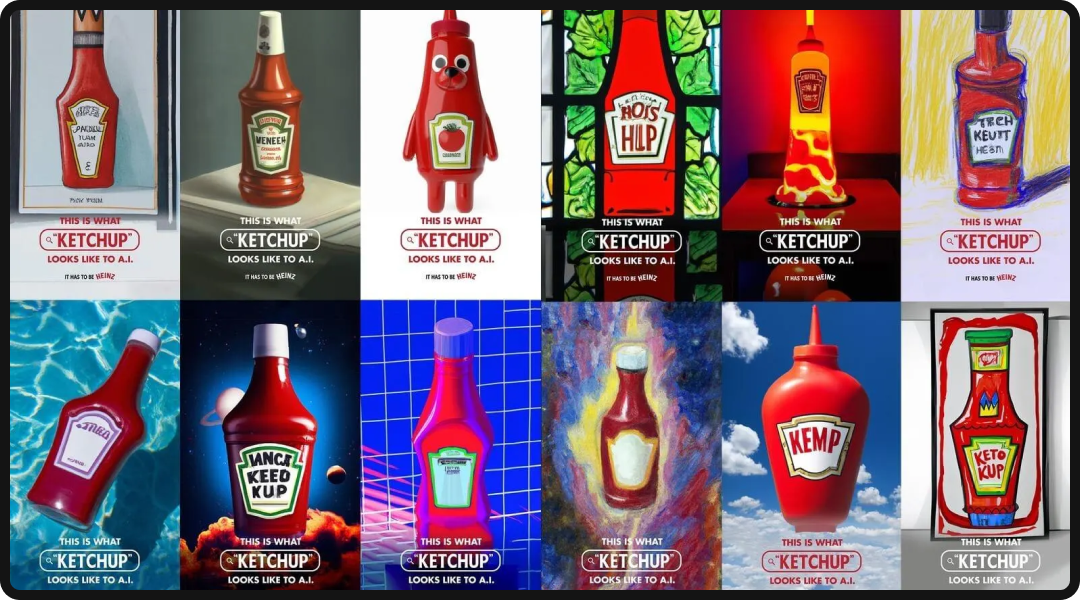
When Heinz wanted to reinforce its iconic status, it turned to generative AI for a clever experiment. The team at ad agency Rethink prompted DALL-E to “draw ketchup,” and the results were strikingly ketchup-like, albeit surreal. This formed the basis of an award-winning campaign showing that even an AI, when asked for “ketchup,” produces something resembling a Heinz bottle.
The Draw Ketchup campaign’s AI-generated visuals were not only attention-grabbing, but also reinforced brand recognition in a novel way. This example shows how marketers can use AI to put a creative twist on brand storytelling: AI becomes a collaborative partner to visualize the brand through a new lens, quickly generating ideas that would take artists much longer to sketch by hand.
Mass Variation in Advertising: Ogilvy’s IBM “FishyAI” Project

Global agency Ogilvy harnessed Adobe Firefly for IBM’s “FishyAI” campaign, dramatically speeding up their design process. They needed a multitude of character variations for the campaign; traditionally, creating these illustrated characters in all their different poses and styles would have been a labor-intensive task.
With generative AI, though, Ogilvy cut the character design time from around 15 days to 2 days per variation, slashing the overall production timeline from 6 weeks to 2 weeks. The AI produced dozens of fish character images in different artistic styles almost instantaneously, which the team then curated and refined.
The extra time saved was reinvested into strategy and fine-tuning the campaign’s message. The campaign demonstrated how AI can boost efficiency without sacrificing creative quality. For marketers, this showcases how AI can handle the heavy lifting of producing multiple ad variants (for different demographics, channels, A/B tests, etc.), allowing human creatives to focus on selecting and polishing the best concepts.
Social Media Content & Co-Creation: Coca-Cola’s “Create Real Magic”
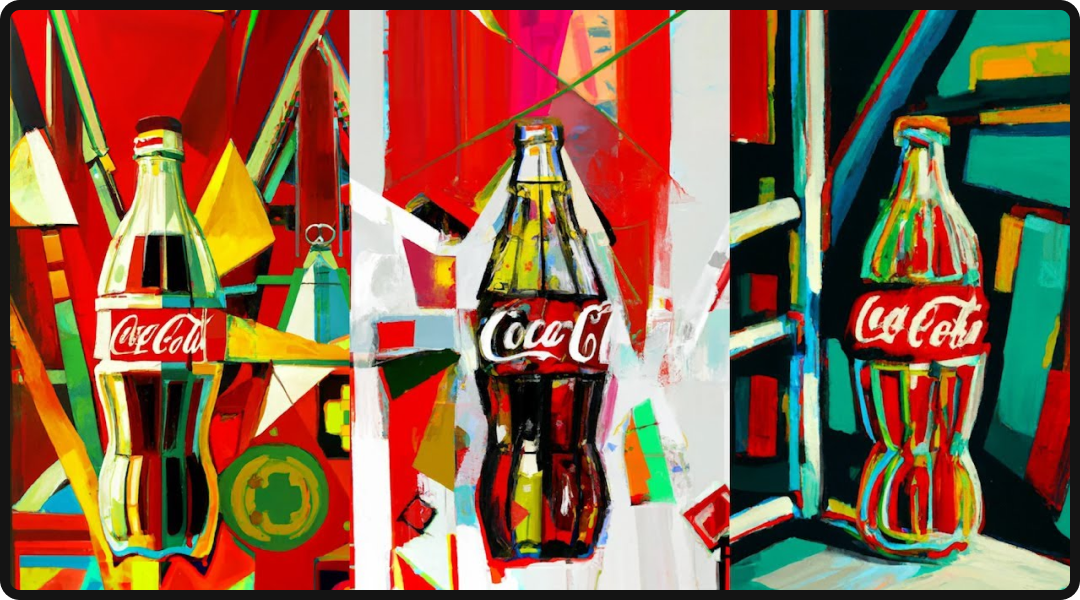
In 2023, Coca-Cola launched an innovative contest called “Create Real Magic”, inviting fans to generate Coke-themed artwork using a custom AI platform powered by DALL-E and GPT-4.
Participants could combine Coca-Cola’s iconic imagery with AI’s endless creativity, resulting in hundreds of unique pieces of art. Coca-Cola then showcased selected fan-generated AI artworks in its marketing, effectively co-creating with its audience. This campaign served multiple purposes: it crowd-sourced fresh creative content, engaged consumers deeply by letting them play with AI and the brand’s assets, and associated the Coca-Cola brand with cutting-edge innovation.
The success of Create Real Magic demonstrated a practical marketing use-case for AI design tools: not only to speed up internal workflows. but also to foster interactive campaigns where consumers become creators via AI. Marketers can take note that generative AI can be a tool for engagement, not just production; it opens opportunities for interactive experiences (think AI-designed product customizations, or contests where users generate their own ads for the brand).
The Near Future: Design Collaboration, Roles & Aesthetics in an AI Era
As AI takes over routine production work, designers are shifting from pixel-pushers to curators and strategists. They’re spending less time executing and more time directing creative vision, shaping brand expression, and deciding which AI-generated options actually work. It’s less about making every pixel perfect and more about guiding the overall direction.
At the same time, increasingly accessible AI design tools will democratize creation, enabling non-designers to produce usable assets and accelerating experimentation; while also creating new challenges around generic outputs, brand consistency, and quality control, pushing designers into more editorial roles where they define systems, standards, and guardrails.
This shift is already giving rise to new hybrid roles:
- Prompt Engineers, specializing in crafting effective AI inputs.
- AI Art Directors, curating and directing AI-generated outputs.
- Creative AI Strategists, defining AI integration across campaigns.
- AI Ethics Specialists, ensuring responsible and brand-safe AI use.
In fact, most CMOs are already using or exploring generative AI, signaling rapid upskilling across the industry.
The future? Think of it as a “centaur” model: half human, half AI, working together in real time. Designers will work inside platforms like Figma, Canva, and Adobe, iterating with AI on the fly. The weird part? We’ll need to learn how to brief and critique AI the same way we’d work with a junior designer. Modifiers like, “No, that’s not quite right, try again,” become part of the workflow.

Aesthetically, AI will unlock new, surreal, hyper-detailed, and hybrid visual styles (while simultaneously making some looks ubiquitous, increasing the value of intentionally human-made work and forcing brands to strike a balance between AI-native experimentation and authentic identity).
Overall, the near future of design promises expanded possibilities, new roles, and a redefinition of what creative collaboration looks like.
Conclusion: Embracing AI-Driven Design for Tomorrow’s Marketing
An effective AI design strategy isn’t a future concept; it’s the present, and marketers who embrace it as a creative co-pilot are already unlocking faster production, greater personalization, and higher ROI, while those who resist risk falling behind.
The most effective teams treat AI as a catalyst that amplifies human creativity by taking over repetitive work so that designers can focus on strategy, storytelling, and innovation, but doing this well requires building AI literacy, setting ethical guidelines, and maintaining a strong human-centered mindset. Experimenting with tools like Midjourney, Firefly, and Figma AI helps teams learn, refine best practices, and ensure AI-generated content still connects emotionally; because in an automated, data-driven world, empathy and originality become even more valuable.
The bottom line: AI works best when it’s collaborating with humans, not replacing them. The agencies and teams that figure out this balance (using AI for speed and scale while keeping humans in charge of strategy and creativity) are the ones that’ll stay ahead.
As roles evolve and tools advance, the core of great design remains the same, understanding people; and the agencies that proactively and responsibly integrate AI will shape the future of marketing design.
AI Design Strategy FAQs
What are examples of design strategies?
Design strategies are frameworks that guide how teams create and deliver visual content. Traditional approaches include:
- Design systems (reusable components and brand guidelines)
- User-centered design (prioritizing audience research)
- Agile design (iterating in sprints)
In the context of AI, an AI design strategy defines how teams integrate generative tools into their creative process (like using AI for rapid concepting, implementing AI-powered personalization at scale, or adopting a “centaur model” where AI handles production tasks while humans focus on creative direction and brand alignment).
Will AI replace human designers?
No. My fellow designers: take a deep, cleansing breath. Where AI excels at generating variations and handling repetitive work, it lacks the strategic thinking, emotional intelligence, and brand understanding that human designers provide.
AI can create 100 banner ad variations in minutes, but it can’t tell you which one will resonate with your audience or align with your brand voice. The reality is that AI is shifting designers from executors to curators and strategists; directing AI outputs, making high-level creative decisions, and ensuring everything aligns with broader brand goals.
How much does AI design software cost?
AI design tool pricing varies widely.
- Canva AI starts free with basic features, while Canva Pro runs around $15 per month.
- Midjourney subscriptions range from $10-120 per month depending on usage.
- Adobe Firefly is included in Creative Cloud subscriptions ($55-85 per month)
- Tools like Runway ML start around $12 per month.
If you’re looking for something larger scale, enterprise solutions with custom AI models can run thousands per month. For most marketing teams, expect to budget $30-100 per month per user for robust AI design capabilities.
Is AI-generated content copyright-safe?
I’d love to have a black-and-white answer for this, but it really depends on the tool you use, and how you use it.
Tools like Adobe Firefly are trained on licensed content and offer commercial-use indemnification, making them relatively safe. Others like Midjourney have murkier training data that may include copyrighted imagery, creating risk. Additionally, U.S. copyright law generally doesn’t protect fully AI-generated works (only human-authored elements can be copyrighted).
Best Practices: Use enterprise-grade tools with transparent training data, have human designers significantly modify AI outputs, avoid prompts referencing specific artists or copyrighted characters, and check your tool’s terms of service. The safest approach is treating AI as a starting point that humans transform into original work.