

PMax is one of the most misunderstood campaign types in Google Ads. Advertisers either avoid it entirely or launch it without the right setup and wonder why results are flat. Both outcomes are avoidable.
Let me make something clear: Performance Max is not a replacement for traditional Search. It is a complementary campaign type with a specific role, so knowing when it belongs or doesn’t belong in your account can determine whether it drives real growth or burns budget across seven channels at once.
What Is PMax?
PMax stands for Performance Max. It is a goal-based campaign type that gives advertisers access to all of Google’s ad inventory from a single campaign. Instead of building separate campaigns for Search, Shopping, YouTube, Display, Discover, Gmail, and Maps, you consolidate everything into one campaign and Google’s AI handles placement, bidding, and creative optimization across all of them in real time.
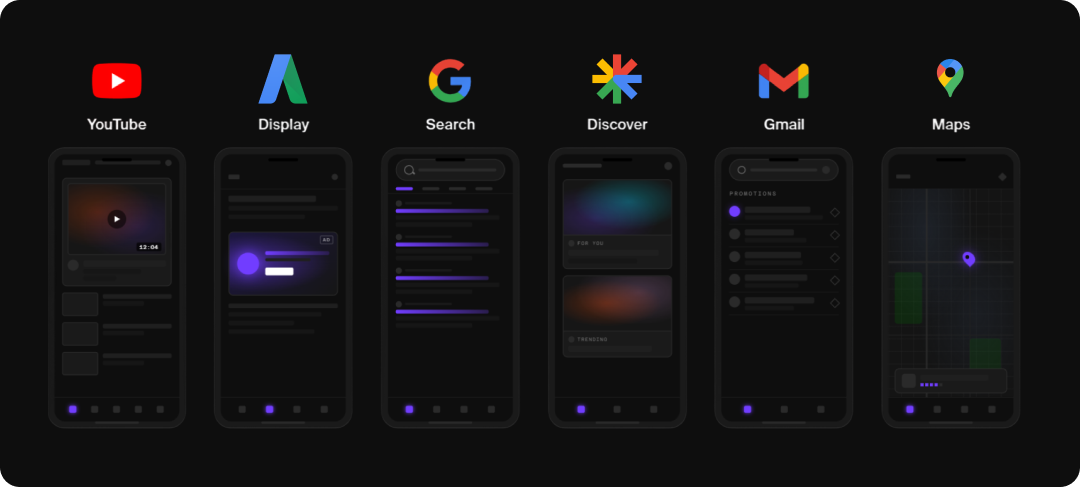
PMax campaigns are built around conversion objectives: sales, leads, store visits. You provide the inputs: creative assets, audience signals, a product feed if you have one, and a budget. Google figures out the rest.
Google’s AI powers every layer of the campaign: bidding, budget allocation, audience discovery, creative combinations, and attribution. That automation can either be the greatest benefit or worst pitfall for a campaign, depending on how well you are able to teach and guide the platform.
What Is the Purpose of PMax?
Search is an excellent bottom-of-funnel channel. It is exceptional at capturing demand that already exists. When someone types “project management software” into Google, they know what they want. But Search does not build that demand in the first place.
PMax is designed to cover the full customer journey. Rather than managing multiple campaigns for each touchpoint, one PMax campaign adapts to multiple stages of the funnel simultaneously. Let’s review the “project management software” example again;
Your target customer is an operations manager at a mid-size company. You communicate this to Google by uploading your customer match list of existing buyers, layering in a custom segment built around search terms like “project management tools for teams” and “asana alternatives,” and add in-market audiences for business software.
- A YouTube ad introduces your brand to an ops manager who has never heard of you.
- A Display ad brings them back to the site a few days later.
- By the time they search “project management software”, your Search ad is there to close it.
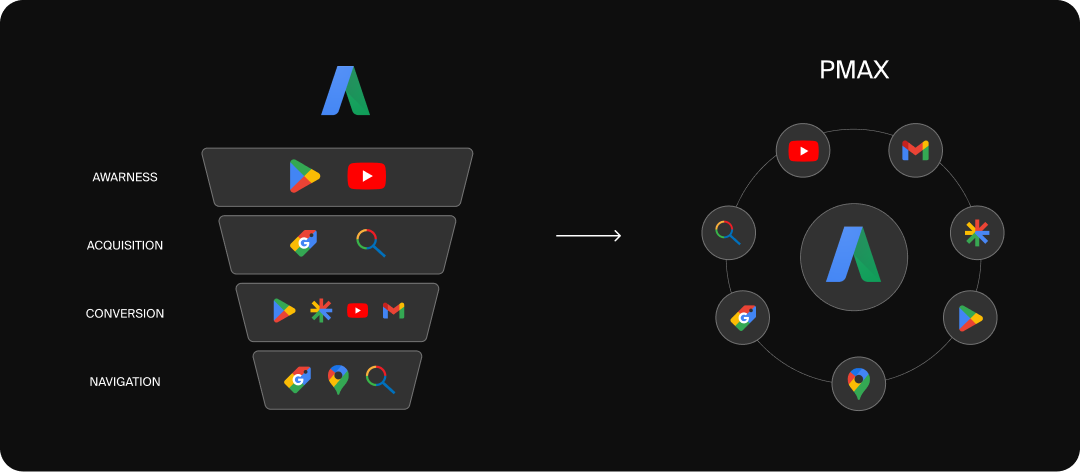
Essentially, PMax meets the person where they are at in the purchase journey, instead of waiting until they have high enough intent to manually run a search themselves.
Another purpose is scale. If your Search campaigns are performing but you have hit a ceiling on conversion volume, PMax gives Google room to find converting audiences outside of active search intent. It unlocks customer segments you would not have found through keyword targeting alone.
Finally, it streamlines campaign management. Running separate campaigns for each campaign type means seven different setups, seven different budgets, and seven sets of performance data that do not talk to each other.
PMax consolidates all of that into one campaign where the channels share signals, inform each other, and optimize toward the same goal. A conversion on YouTube feeds the same algorithm that adjusts your Shopping bids. That interconnected learning is something you simply cannot replicate when the campaigns are siloed.
What Is the Difference Between Google Search & PMax?
This is the most important distinction before you decide whether PMax belongs in your account.
- Google Search is keyword driven and offers ultimate control. You define the terms that trigger your ads, write ad copy, control bidding, and direct traffic to specific landing pages. It is a high intent, bottom of funnel channel with transparent reporting. You know exactly what queries triggered your ads, where your budget went, and how each keyword performed.
- Performance Max is signal-driven. Instead of keywords, you provide search themes, audience signals, creative assets, and conversion goals. Google’s AI interprets those inputs and determines placement, audience, and bid in real time across all seven channels. The control shifts from you to the algorithm.
|
Feature |
Traditional Google Search |
PMax |
|---|---|---|
|
Targeting |
Keywords and match types |
Search themes, audience signals, creative assets |
|
Channels |
Google search |
Google Search, YouTube, display, discover, Gmail, Google Maps |
|
Creative |
Text, with the option for ad extensions (sitelinks, callouts, images, logos, etc.) |
Asset-based ads combining images, videos, headlines, descriptions, logos, and feeds into multiple formats |
|
Automation |
Low-Moderate; primarily manual control with the option to automate elements (asset combinations, bidding, etc.) |
High; Google decides targeting, bidding, placements, and creative combinations based on your guidance, but does not provide the opportunity for granular control |
|
Best For |
Bottom of funnel; high-intent demand capture |
Full-funnel scaling |
Who Should Use PMax?
Google sometimes markets PMax as a starter campaign, but that’s not necessarily the case. PMax is built for accounts that already have a solid conversion foundation through other campaign types, and are ready to scale beyond it. A few things need to be in place before the campaign can do its job.
- Conversion Volume: Each PMax campaign needs a minimum of 20 to 30 conversions per month to optimize effectively. Without that data, the algorithm cannot learn. Accounts below that threshold are better off building volume through Search first, then layering in PMax once the data is there.
- Quality Creative Assets: PMax runs across visual channels. That means videos, images in multiple aspect ratios, headlines, and descriptions. If you cannot supply a variety of assets, Google will auto generate them from your landing page and those assets rarely reflect your brand accurately.
- Clean Conversion Tracking: PMax optimizes toward whatever signal you feed it. If your tracking is inaccurate or you are prioritizing low value conversions the same as high value purchases, the algorithm will optimize in the wrong direction.
When Should You Integrate PMax Into Your Account?
The right time to add PMax is when your Search campaigns are working and you want to grow beyond the ceiling they can reach. Key things to consider:
- Are your Search campaigns consistently hitting target CPA or ROAS goals?
- Are your Search campaigns regularly generating at least 30 conversions in the last 30 days?
- Do you have a comprehensive suite of high converting assets?
- Have you exhausted keyword expansion opportunities?
- Are you looking to find net new audiences outside of active search intent?
PMax is designed to complement keyword based Search, not replace it. If you are running a well functioning Search campaign, and are looking to grow, then PMax is a natural next step.
When Should You Not Integrate PMax?
There are clear scenarios where PMax will drain budget without delivering results worth the spend:
- Your account lacks conversion history: The algorithm needs at least 30 conversions per month to optimize effectively. Below that threshold, the learning period becomes an expensive guess. Build volume through Search first.
- Your budget is too limited: PMax spreads spend across multiple channels simultaneously. A small daily budget distributed across seven channels does not give any single channel enough data to optimize. A focused Search campaign will outperform a starved PMax campaign every time.
- Your creative resources are limited: If you do not have the bandwidth to produce video or original imagery, PMax will generate assets automatically. Those auto generated assets often lack brand consistency and can actively hurt performance. If creative production is not realistic right now, PMax is not either.
- You need strict query level control: PMax still has less search term transparency than traditional Search, even after 2025 updates introduced campaign level negative keywords and search term insights. Regulated industries, compliance sensitive verticals, and businesses that require precise control over which queries trigger their ads are better served staying in Search.
- Your Search campaigns are not performing: PMax amplifies what is already there. If there are structural problems, poor landing pages, weak conversion tracking, or any other key foundational errors, PMax will scale them.
Best Practices for PMax
Use Your Audience Signals Wisely
Audience signals provide targeting guidance, but do not restrict targeting to only the provided parameters. They are a way of telling Google to look at the suggested audience first, and then expand to find similar audiences.
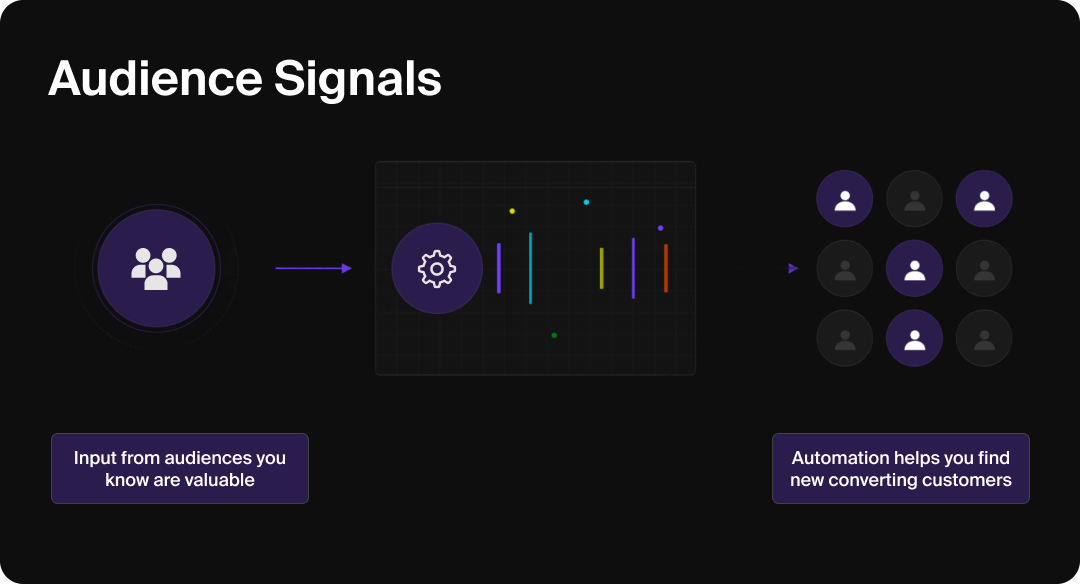
Your customer match list is your strongest signal. Whether you are an eCommerce brand uploading buyer emails, a SaaS company uploading converted trial users, or a lead gen business uploading closed won contacts, that list gives Google a precise profile of what a real customer looks like.
Layer in website visitors, custom segments built around high intent search terms, and audiences based on competitor URLs. The goal is to give Google a clear picture of your best customer and let it find more people who match. Quality over quantity is the right framework. A small, accurate signal beats a wide, vague one every time.
Invest in Your Creative Assets
Upload your own videos rather than relying on auto generation. Auto generated assets pull from your landing page and rarely capture brand voice or differentiation. Aim for multiple aspect ratios, 16:9 and 9:16 at minimum, and mix product focused and lifestyle creative.
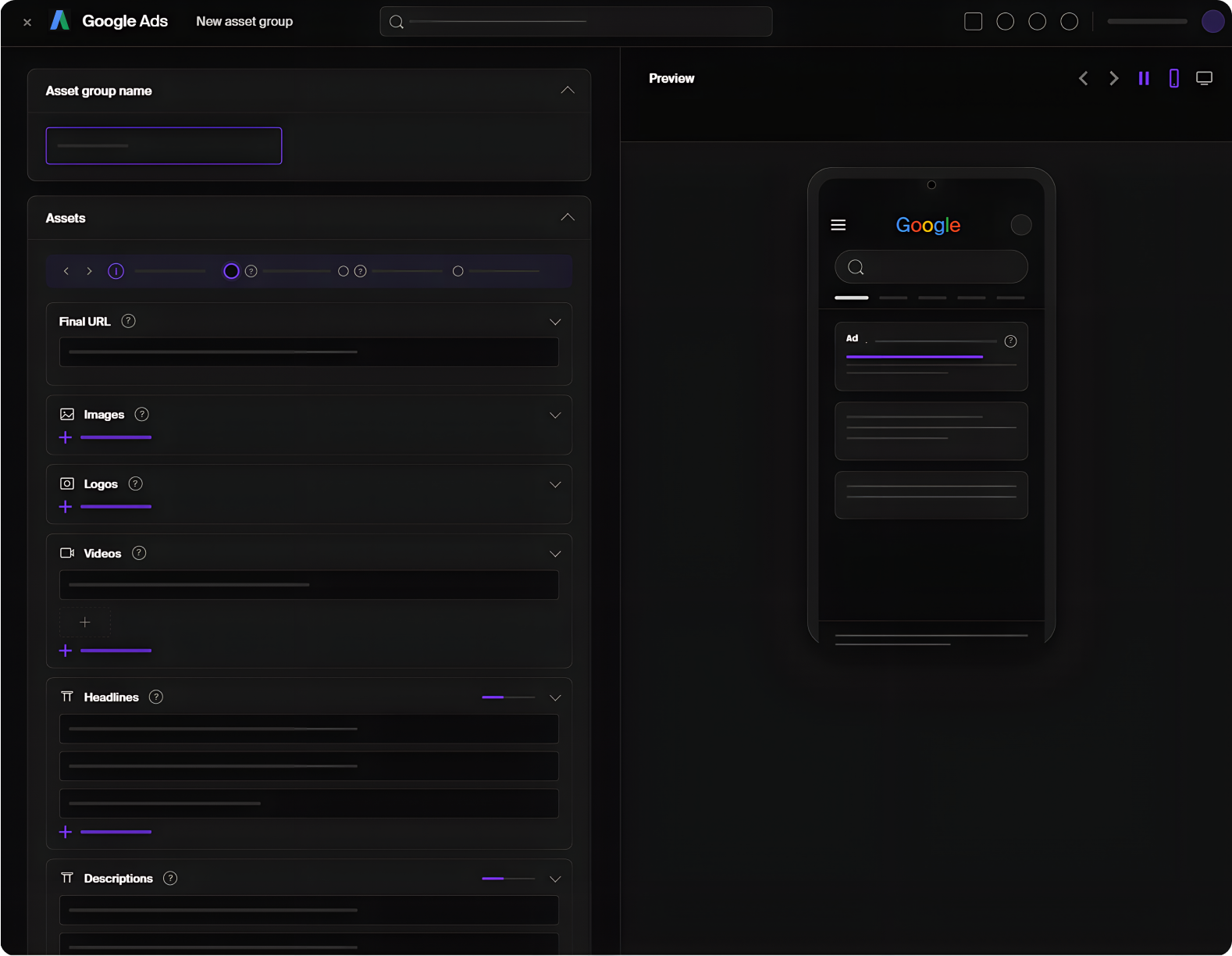
Google rates each asset as Learning, Low, Good, or Best. Check these ratings in your asset group details and replace Low rated assets after at least two weeks of data. Make changes too early and you interrupt the learning cycle before it has a chance to tell you anything useful.
Tailor Search Themes & Negative Keywords Before Launch
Search Themes tell Google’s AI which topics and intent areas to prioritize within your PMax campaign. They are not keywords. They are directional signals, and how you use them determines where your budget flows.
The most common mistake is loading your Search Themes up with variations of the same term. Instead, use themes to introduce concepts the algorithm would not surface on its own. If your landing page is about accounting software, Google already understands that context. A theme like “small business bookkeeping tools” adds something new.
Additional things to consider when building your themes:
- Keep Themes broad, rather than long-tail since “running shoes” gives the algorithm room to learn while “red running shoes size 10” boxes it in before it has data. Each theme should also match the assets and landing page in that specific asset group.
- You can add up to 25 per asset group, but avoid duplicates and closely related variants since they dilute the signal.
- Competitor brand names are fair game as themes as long as they do not violate trademark rules.
- Seasonal themes surrounding events or holidays are worth adding for time sensitive campaigns.
- New campaigns benefit most from a strong theme list since it helps the algorithm find its footing before conversion data exists to guide it. Review your search term insights report regularly and refine based on what is actually triggering your ads.
Negative keywords matter just as much. Campaign-level negative keywords became available to all advertisers in 2025, and should be in place before launch. Block job and career queries, free intent searches if you sell premium products, and informational queries with no conversion path.
Cross reference your Search campaigns’ search term reports. Whatever waste you have already identified there belongs in your PMax negative lists, too.
Match Your Bidding Strategy to Your Data Volume
PMax supports Target ROAS and Target CPA smart bidding. Start with Maximize Conversions, or a loose initial target, and tighten once the algorithm consistently has 30+ conversions to learn from in the last 30 days. Setting an aggressive CPA or ROAS target on a brand new campaign restricts the algorithm before it has the data to meet the goal. The result is a campaign stuck in a learning phase that never graduates.
Give PMax a 4-6 week learning window. Avoid major budget changes or target adjustments during that period. The algorithm needs consistency most in the early weeks.
Monitor Where Your Budget Is Actually Going
Channel performance reporting is now available to all PMax advertisers and it should be a regular part of your optimization routine. You can see a breakdown of budget, clicks, and conversions across Search, Shopping, YouTube, Display, Discover, Gmail, and Maps. That visibility changes how you optimize.
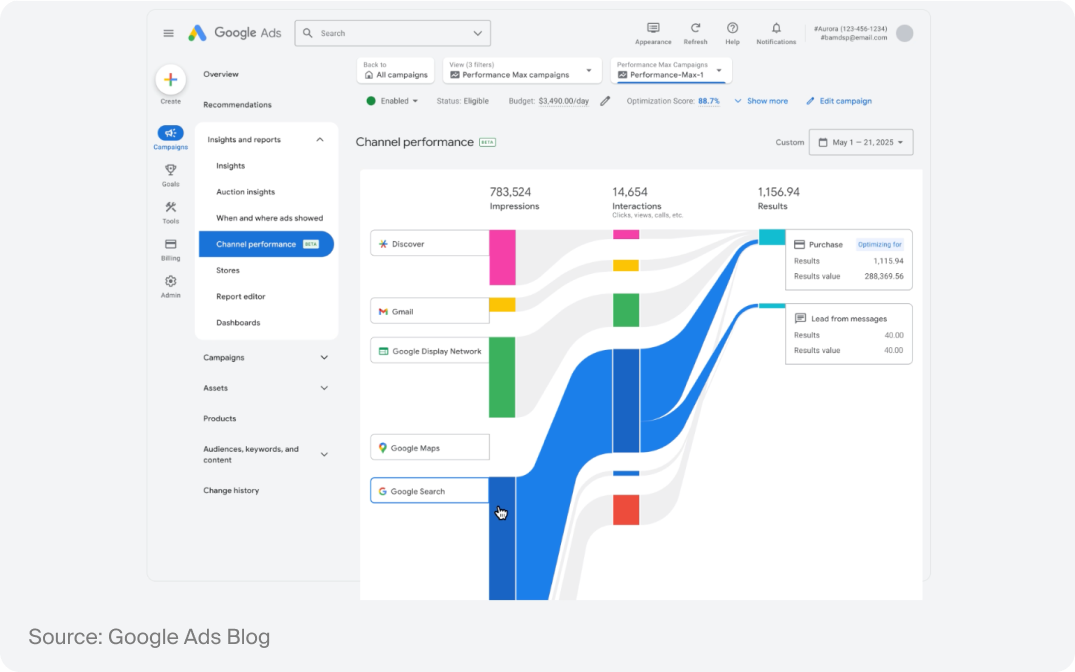
For eCommerce accounts, a healthy PMax campaign typically shows 60 to 80% of spend in Shopping. If Display or YouTube is consuming a disproportionate share without the conversion data to justify it, that is a signal your feed needs work.
The algorithm is defaulting to awareness channels because it finds it easier to spend budget there than on high intent Shopping placements.
Segment by Goal, Not Just Product
Avoid putting everything into one PMax campaign. Separate campaigns allow you to set different ROAS or CPA targets that reflect the actual value of each segment. If you run a single campaign across high margin and low margin product lines, the algorithm will chase volume at the expense of profitability on the products that matter most.
That said, over segmentation is just as damaging. Each campaign needs enough conversion volume to learn independently. If splitting a campaign means neither half reaches 30 conversions per month, consolidate. Data quality always beats structural tidiness.
What This Means for Advertisers
PMax rewards input quality, not hands on management. You are not pulling levers. You are feeding the system. The advertisers seeing real results are the ones who invest in their audience signals, keep creative assets fresh, watch where budget is actually flowing, and use negative keywords to protect against waste.
But PMax does not fix a broken foundation. If your Search campaigns are struggling, your conversion tracking is unreliable, or you are working with a budget that cannot sustain a learning period across multiple channels, fix those things first. PMax will work a lot better once the fundamentals are solid, and it will still be there when you are ready.